November 20, 2026
RFID tree identification connects a tag’s electronic identifier to a permanent record for an individual tree. During a field visit, a reader captures the identifier and software retrieves the associated history so staff can add measurements, treatments or breeding observations.
A successful scan confirms that a tag responded. Staff must still confirm that the tag belongs to the tree being measured. Similar-looking trees, neighboring tags, displaced markers and transplanting can all break that association.
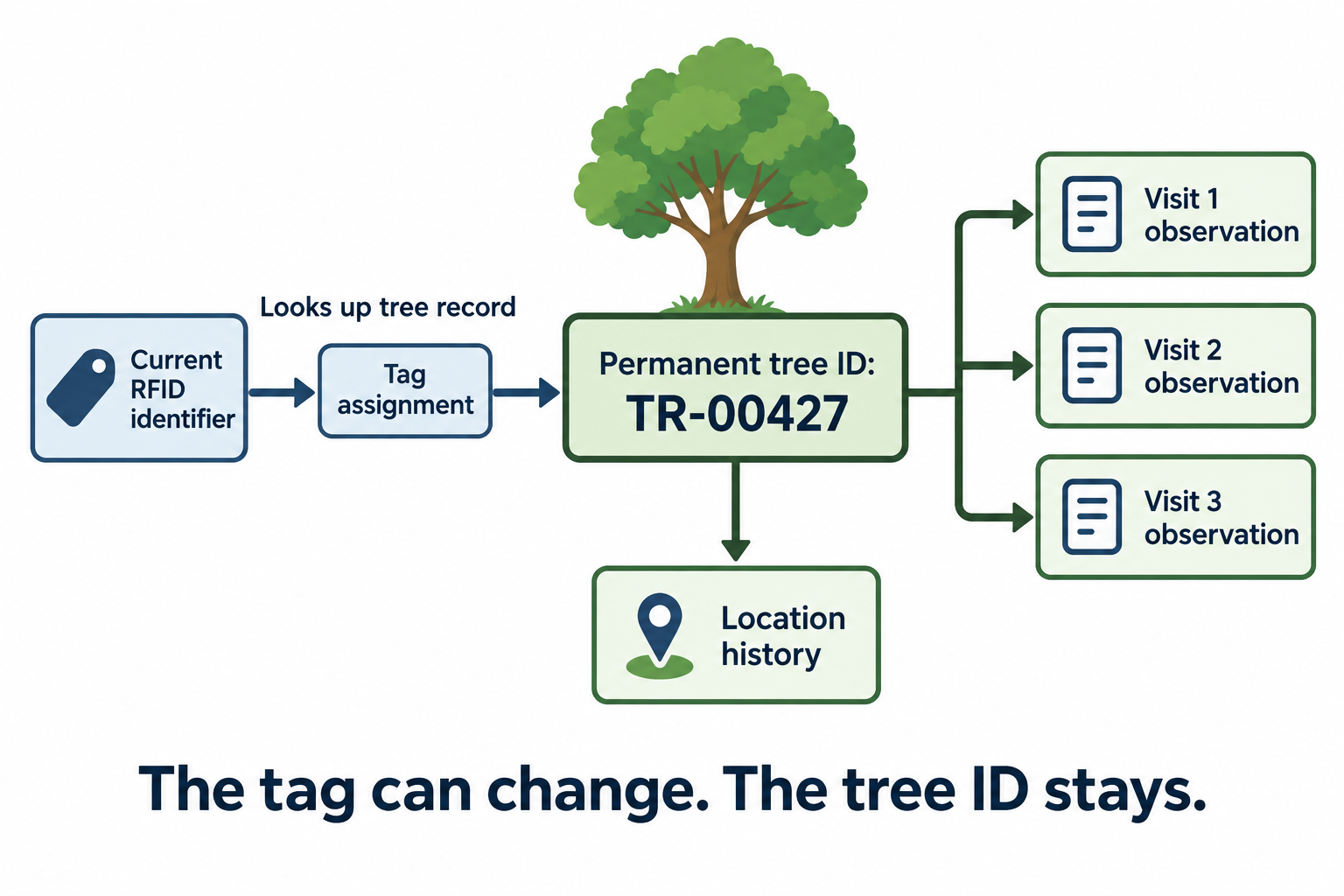
A dependable workflow separates the tree’s identity from its replaceable marker, verifies the association during each visit and preserves dated observations throughout the tree’s life.
Separate tree identity, tag assignments and observations
| Element | Purpose | What happens over time |
|---|---|---|
| Permanent tree ID | Identifies the individual in the database | Remains the same after tag replacement or transplanting |
| Tag assignment | Connects an RFID identifier with a tree ID | Changes when a marker is replaced; earlier assignments remain in history |
| Observation | Records a measurement or event for the tree | A new dated entry is added for each observation |
For example, tree TR-00427 can receive a replacement tag while retaining its height measurements, parentage and treatment history under the same tree ID. Creating a new tree record because the tag changed would split that history.
Keep location separate from identity too. A transplanted tree can occupy several locations during its life, and a planting position can receive a different tree after removal. Neither event should transfer old measurements to another individual.
How the tag retrieves a record
A passive UHF tag obtains power from the reader’s radio signal and returns data through backscatter. The reader passes an identifier to an application, which looks up the associated tree record.
In a typical EPC Gen2 implementation, the application uses the EPC value returned during inventory. Define the identifier field and format consistently across readers, software and imports. Preserve leading zeros and prevent spreadsheet conversions from altering identifiers.
The tag does not need to contain the full tree history. A database provides room for observations, photographs, corrections and backups. An ordinary identification tag does not measure growth or continuously report location; those data come from field observations or separate instruments.
Enroll each tree and verify its tag association
Complete enrollment one tree at a time. The goal is a verified connection between the physical tree, its electronic identifier and its permanent record.
- Identify the physical tree. Check its existing label, planting record and plot position. Add a reference photograph where useful. Resolve conflicting records before activating an assignment.
- Retrieve or create the permanent tree record. Search for an existing tree ID first. Record species, accession or breeding information, planting date when known, and current location.
- Allocate an unused tag identifier. Check the assignment register, including retired identifiers. A writable EPC is not automatically unique simply because it is stored on an RFID tag.
- Encode and read back the intended tag. Isolate it from other tags during writing. Compare the returned identifier with the allocated value rather than relying only on a write-success message. For pre-encoded tags, capture and validate the existing identifier instead.
- Save the assignment. Record the exact identifier, permanent tree ID, assignment date and operator. Reject an identifier already assigned to another tree.
- Install and verify. Scan the installed marker, retrieve the record and compare its displayed tree ID and location with the actual tree before completing enrollment.
Provide a visible tree ID as a second way to find the record. It supports routine cross-checks and recovery when a tag cannot be read.
Duplicate prevention must cover the whole project. If teams enroll trees offline, allocate separate identifier pools in advance and check assignments again during synchronization. Hold conflicting assignments for review rather than accepting whichever upload arrives last.
Build an RFID tree tag database that preserves history
A useful RFID tree tag database separates tree information, tag assignments, locations and observations. The software can vary; these relationships determine whether the history remains usable.
| Record group | Useful fields | Purpose |
|---|---|---|
| Tree | Permanent tree ID, species, accession, planting date, status | Maintains individual identity |
| Breeding relationships | Family or cross ID, parent IDs, clone or provenance reference, information source | Preserves breeding context |
| Tag assignment | Identifier, tree ID, start and end dates, active or retired status, replacement reason | Tracks changes in physical markers |
| Location history | Tree ID, site, plot, row, position, coordinates where useful, effective dates | Records movement without changing identity |
| Observation | Observation ID, tree ID, date and time, observer, measurement, unit, method, notes | Makes repeat observations interpretable |
Enforce uniqueness for active tag identifiers in the database, rather than relying solely on staff to notice duplicates. Store identifiers as text in a consistent format. Keep backups and an export path so records remain available when devices or software change.
Preserve individual identity within breeding records
Several trees may share a family or clone reference. Each individual still needs its own permanent tree ID because growth, survival, treatment and sampling can differ.
For RFID tree breeding records, store parentage and cross information as linked fields rather than encoding the whole pedigree into the tag identifier. A scan retrieves the individual record; it does not establish genetic identity or verify parentage.
Give collected tissue, seed or other samples their own identifiers, linked to the source tree and collection event. This preserves traceability after the sample leaves the field.
Add measurements without erasing earlier visits
Save observations as dated entries. Replacing a single “height” value loses the sequence needed to assess growth. Record units and methods consistently, and distinguish “not measured” from a measured value of zero.
Corrections should retain the previous value, the change, the operator and the reason. This lets later users distinguish a biological change from a data correction.
Verify the intended tree during every field visit
A UHF reader may detect several nearby tags. The first identifier returned, or the strongest signal, does not reliably identify the tree an operator intends to measure.
Use the sequence scan, retrieve, confirm, observe, save. Display the permanent tree ID, current plot position and an identifying detail such as a photograph or visible label reference. Confirm these against the physical tree before entering measurements. If several tags respond, require deliberate selection and physical confirmation.
| Field situation | Response |
|---|---|
| Tag retrieves the expected tree | Confirm the physical match, then save the observation |
| Several nearby tags respond | Identify the intended marker and confirm its tree association |
| Readable identifier has no database match | Record an unassigned-tag exception and investigate before creating a tree record |
| Retrieved location or visible ID disagrees | Hold the observation for review; check for marker displacement or incorrect assignment |
| Tag cannot be read | Investigate using the visible ID and planting records; record the read failure |
| Same identifier appears on different trees | Suspend the affected assignments until the duplicate is resolved |
A missed read does not establish that a tree is missing or dead. A readable stake in an empty planting position does not establish that the tree is still present.
For offline visits, load the relevant records before departure. Store each observation with a unique event ID so synchronization can avoid duplicate uploads. Flag conflicting edits and show which observations remain pending. If identity is uncertain, preserve the field notes as an unresolved event rather than attaching them to a guessed tree.
Preserve identity when tags fail or trees move
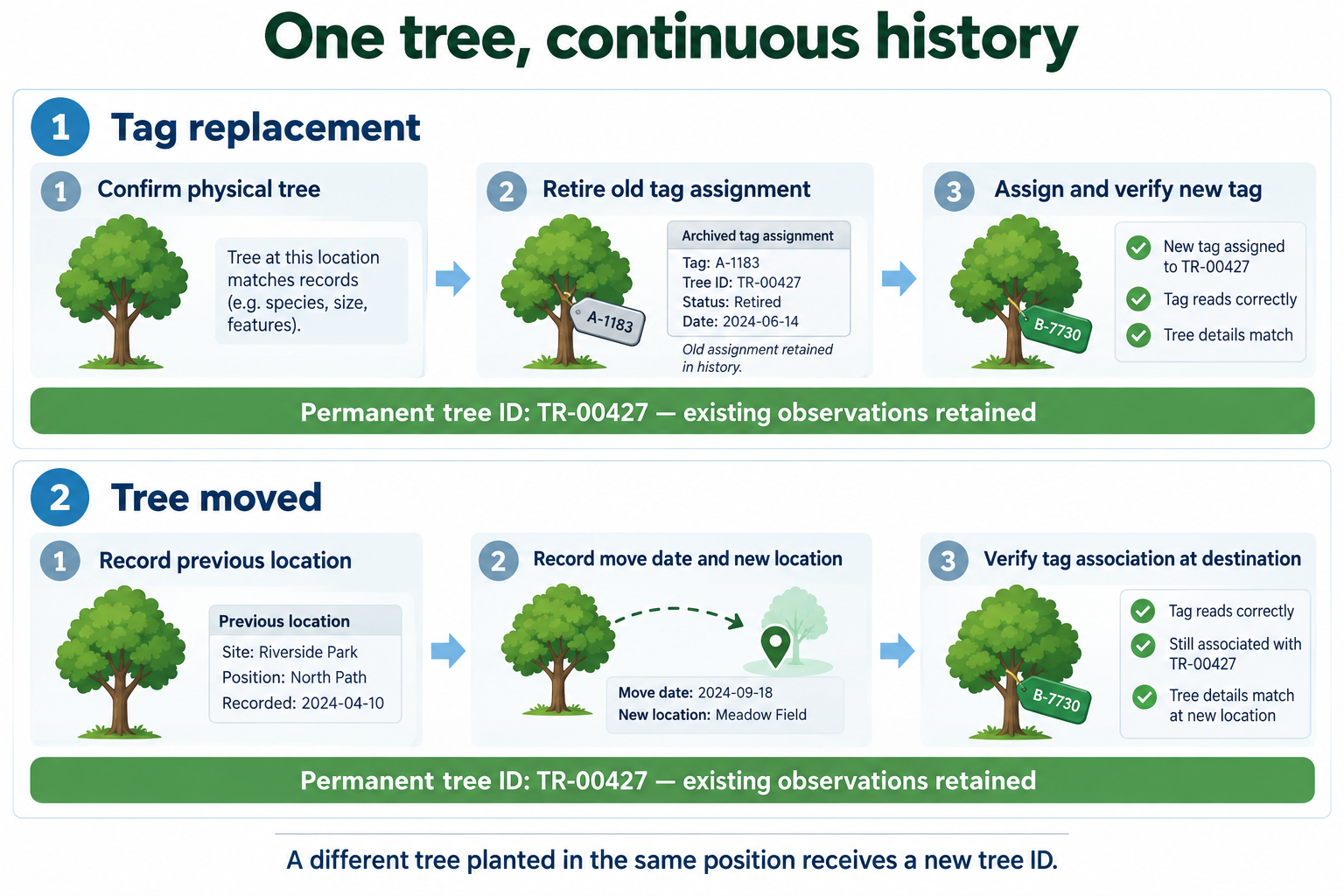
Replace a marker without creating a new tree
Recover identity from the visible label, planting map, earlier photographs and other available records. If these disagree, mark the identity as unresolved.
Once identity is confirmed, allocate a new tag identifier and link it to the existing permanent tree ID. End the old assignment, record the replacement date and reason, and verify the new marker after installation. Retain the old identifier in the assignment history.
Remove the old marker if present. Configure the application to flag a retired identifier if it is scanned again, and avoid reusing retired identifiers for other trees. Historical observations should stay attached to their permanent tree IDs even after the assignment changes.
Record a transplant as a location change
Keep the same permanent tree ID. Record the move date, previous location and new location, then verify the tag-to-tree association at the destination.
A soil marker can remain behind when a tree is lifted. Include marker transfer or replacement in the transplanting procedure. The destination scan should retrieve the moved tree’s existing history.
If a tree dies or is removed, retain its record with the appropriate status. Give any replacement planted in that position a new tree ID.
Using the soil-insertion UHF tree tag
DO RFID TAG’s existing description presents its ISO-18000 6C Tree Breeding Tag as a passive UHF RFID tag with a soil-insertion form. It provides a physical marker for the workflow; record continuity depends on the application and field procedures.
The following specifications are attributed to the existing listing, rather than independently verified field-test results.
| Parameter | Existing listing value |
|---|---|
| Type | UHF passive RFID tag |
| Frequency | 860–960 MHz |
| Protocol | EPC Class 1 Gen2, ISO 18000-6C |
| Dimensions | 345 × 25 × 10 mm (customizable) |
| Inlay material | PET + Aluminum |
| Outer material | Industrial Plastic |
| Memory | Up to 512 bits |
| Chip | Alien / Impinj; exact model unspecified |
| Mode | Read/Write |
| Reading distance | Up to 3 meters |
| Operating temperature | −20°C to +50°C |
| Storage temperature | −40°C to +100°C |
| Packaging | 100 pcs per pack |
The listing separately states “Length up to 300mm.” Whether this refers to an insertion section or a variant remains unclear. It is not an installation-depth instruction; use the applicable drawing and manufacturer’s instructions for the supplied version.
“Up to 512 bits” does not specify the memory bank or exact chip configuration. The listed reading distance of up to 3 meters is not a guaranteed field distance: performance depends on the installed tag, reader configuration, orientation and surroundings. The storage temperature range is separate from the operating range.
Install the soil marker and verify it in place
Follow the manufacturer’s instructions for insertion depth, orientation and handling. Choose a position that clearly associates the marker with one tree while accounting for roots, irrigation and maintenance work. Record its position relative to the tree and verify readability after installation.
Do not assume that the antenna section should be buried. Wet soil and surrounding plant material can affect UHF performance; the specified insertion geometry should determine placement. The pointed form alone does not establish root safety or resistance to displacement.
This soil-insertion form differs from trunk-mounted or embedded tags. Those forms have different attachment and tree-growth considerations, and research on them does not validate this product’s performance.
Compare identification methods by field task
RFID, barcodes and printed identifiers can all reference the same tree database. Their main differences concern how staff capture an identifier and maintain its physical marker.
| Method | Useful for | Field consideration |
|---|---|---|
| Passive UHF RFID | Capturing identifiers without aligning a scanner to a visible printed code | Nearby tags may respond, requiring confirmation of the intended tree |
| Barcode or QR code | Deliberately scanning a visible marker | The code needs sufficient visibility, contrast and physical integrity |
| Printed or engraved tree ID | Visual checks and recovery when electronic reading is unavailable | Manual entry can introduce transcription errors |
| NFC | Deliberate close-range identification with compatible devices | Requires close access; ordinary phone NFC does not read UHF EPC Gen2 tags |
Durability depends on marker material, enclosure, attachment and exposure. The identification technology alone does not establish service life. Combining RFID with a visible tree ID provides convenient capture and a practical recovery path.
Test record continuity before expanding deployment
Pilot enrollment, repeat observations, tag replacement, transplanting and offline synchronization. Include representative soil conditions and exposure, and check whether staff consistently distinguish neighboring trees.
Measure correct record retrieval, wrong-tree selections, unreadable or displaced markers, unresolved assignments and time per completed observation. A fast scan is useful only when the saved observation belongs to the intended tree.
Plan periodic marker inspections. A CNR research abstract reports testing seven UHF tag models on standing trees over two years, including damage and reduced readability in some models. These findings support maintenance planning; they do not establish a lifespan for this soil-insertion tag.
Assess costs using measured field work alongside tags, readers, software integration, training and replacement effort. Any payback estimate should follow those project-specific figures. Before expanding, verify that staff can recover the same tree history after both a marker replacement and a move.

Do RFID is a leading China-based manufacturer with over 15 years of experience. We specialize in customized RFID readers, tags, and cards, delivering high-quality, tailored solutions that meet your unique business needs and drive seamless, efficient identification.