November 5, 2026
The C1 Android POS terminal is a flexible point-of-sale solution designed for retail stores, restaurants, supermarkets, hotels, cafés, and other businesses that need a reliable touchscreen cash register. With a 15.6-inch Full HD main display, optional customer-facing display, built-in thermal printer, multiple connectivity options, and Android-based operation, the terminal provides a practical platform for modern POS applications.
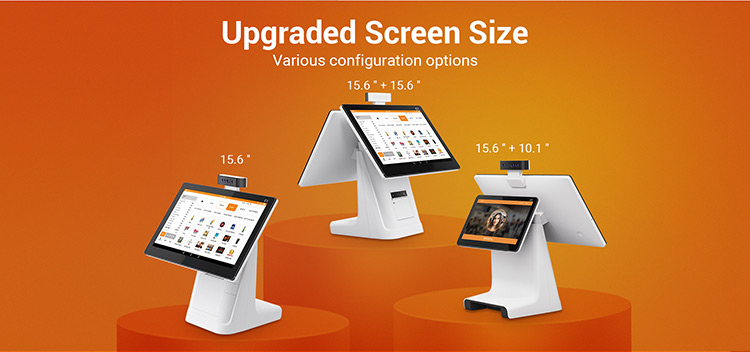
The C1 is available in single-screen and dual-screen configurations, allowing businesses to choose a setup that matches their counter space, customer interaction requirements, and software environment. Optional cameras, 4G, GPS, larger storage, MDM, and other configurations are also available for different projects.
Android POS register machine C1 adopts up to Android 9.0 system, dual-core processor, and large capacity memory to ensure faster system operation, stronger expansibility and better user experience.
Key Features of the C1 Android POS Terminal
The C1 combines the main functions required for a modern POS system in one compact terminal. Its large touchscreen provides a clear interface for cashiers, while the optional second display can be used for customer information, advertising, product details, order confirmation, or payment-related interaction.
Key features include:
- 15.6-inch Full HD capacitive touchscreen
- Single-screen or dual-screen configurations
- Optional 10.1-inch, 11.6-inch, or 15.6-inch customer display
- Optional LED or Nixie tube customer display
- Android 9 or Android 10 operating system, depending on hardware configuration
- Quad-core or octa-core processor options
- Up to 4GB RAM and 64GB eMMC storage
- Built-in 58mm thermal printer with optional 80mm printer
- Wi-Fi, Bluetooth, and Ethernet connectivity
- Optional 4G and GPS
- Optional single-lens, dual-lens, or 3D depth-sensing camera
- Four USB ports plus additional peripheral interfaces
- Optional Mobile Device Management (MDM)
- SDK support for customized POS software development
- ODM customization for project requirements
Display Options for Different POS Environments
One of the main advantages of the C1 is its flexible display configuration. The standard main screen is a 15.6-inch Full HD capacitive touchscreen with a resolution of 1920 × 1080 pixels.
Businesses can select a single display for conventional cashier operation or add a second screen for customer-facing interaction.
| Display Configuration | Main Display | Customer Display | Recommended Use |
|---|---|---|---|
| Single display | 15.6″ | — | Retail, cafés, small stores |
| Dual display | 15.6″ | 10.1″ | Customer order confirmation |
| Dual display | 15.6″ | 11.6″ | Retail and restaurant POS |
| Dual display | 15.6″ | 15.6″ | High-interaction retail environments |
| Dual display | 15.6″ | LED/Nixie | Price or transaction information |
A dual-screen POS terminal can help create a more interactive checkout experience. The cashier can operate the POS application on the main screen while the second display presents selected information to the customer.
Function Optional
1. Built-in thermal printer: 80mm/58mm Paper width
2. Face recognition camera: Single-lens/dual-lens/3D Depth Sensing Camera
3. voice interaction and voice translation is available
Color Optional: White or black
Service:
1. Support ODM
2. Support free SDK to develop software
3. Support MDM (Mobile Device Management) service
4. Samples in stock, fast shipment after payment succeeded
Specification
| RK Scheme | OS: Android 9 Processor: Quad-core 1.4GHZ+Dual core1.8GH |
| Qualcomm Scheme | OS: Android 10 Processor: Octa-core 1.8GHZ |
| Memory | 2GB DDR, 8GB eMMC, Ext. TF card slot 2GB DDR,16GBeMMC(Optional) 4GB DDR,64GBeMMC(Optional) |
| Display | 4 Options: 1/ 15.6-inch+15.6-inch, 1920*1080; 2/ 15.6-inch+Nixie tube, 1920*1080; 3/ 15.6-inch+10.1-inch, Main Display:1920*1080 4/ Single Display: 15.6-inch, 1920*1080; |
| Camera | Single-lens Camera Dual-lens Camera(Optional) 3D Depth Sensing Camera |
| Printer | Paper width 58mm, Φ50mm Paper width 80mm(Optional) |
| Communications | WiFi/BT/Ethernet 4G(Optional) GPS(Optional) |
| Audio | Digital Audio Speaker Microphone |
| Peripheral Ports | 4*USB, 1*Micro USB, 1*RJ11, 1*RJ12, 1*RJ45, 1*Audio Jack |
| Power Supply | 24V/2.5A |
| Others | 1 Power Key |
| MDM (Optional) | Mobile Device Management |




Why Choose a Dual-Screen POS Terminal?
A conventional POS terminal normally provides one screen for the operator. A dual-screen POS system adds another communication point at the checkout counter.
The customer-facing screen can be used to display:
- Order details
- Product information
- Prices and totals
- Promotional content
- Advertising
- Customer messages
- Transaction confirmation
This configuration is particularly useful in restaurants, cafés, convenience stores, retail shops, and other environments where customers need to see transaction information during checkout.
For businesses that do not require a customer display, the single 15.6-inch configuration offers a simpler and potentially more space-efficient solution.
Android POS Hardware Configurations
The C1 is available with different processor and operating system configurations. The original product specification lists an RK-based configuration with Android 9 and a Qualcomm-based configuration with Android 10.
| Configuration | Operating System | Processor | Standard Memory | Optional Storage |
|---|---|---|---|---|
| RK scheme | Android 9 | Quad-core 1.4GHz + dual-core 1.8GHz | 2GB DDR + 8GB eMMC | 2GB + 16GB |
| Qualcomm scheme | Android 10 | Octa-core 1.8GHz | 2GB DDR + 8GB eMMC | Up to 4GB + 64GB |
The device also provides an external TF card slot, giving system integrators an additional storage option where supported by the selected hardware configuration.
For a basic POS application, the standard memory configuration may be sufficient. More demanding applications, multimedia content, remote management, or customized software may benefit from the higher-memory and larger-storage options.
Built-In Thermal Printer
The C1 can integrate a thermal receipt printer directly into the POS terminal. This reduces the need for a separate receipt printer and helps keep the checkout counter organized.
The standard printer configuration supports 58mm paper, with an optional 80mm paper width available.
| Printer Option | Paper Width | Suitable For |
|---|---|---|
| Standard thermal printer | 58mm | Compact receipts and standard POS transactions |
| Optional thermal printer | 80mm | Longer receipts and businesses requiring wider printouts |
An integrated printer can be useful for retail receipts, restaurant orders, transaction records, and other printed POS documents.
The final printer configuration should be confirmed according to the required paper roll size, printer mechanism, software compatibility, and project requirements.
Optional Camera and Customer Interaction
The C1 can be configured with different camera options depending on the intended application.
Available configurations include:
- Single-lens camera
- Dual-lens camera
- 3D depth-sensing camera
Camera integration provides additional flexibility for applications that require visual interaction or identity-related functions. The appropriate camera should be selected according to the software application and project requirements.
Businesses considering face recognition or other camera-based functions should confirm the required SDK, operating environment, lighting conditions, data-processing method, and compliance requirements before deployment.
Connectivity and Peripheral Interfaces
A POS terminal often needs to connect with printers, scanners, cash drawers, payment peripherals, network equipment, and other accessories. The C1 provides several interfaces for connecting external devices.
| Interface | Quantity | Potential Application |
|---|---|---|
| USB | 4 | Barcode scanners, keyboards, USB peripherals |
| Micro USB | 1 | Service or peripheral connection |
| RJ11 | 1 | Compatible POS peripherals |
| RJ12 | 1 | Cash drawer or POS peripheral applications |
| RJ45 | 1 | Wired Ethernet networking |
| Audio jack | 1 | Audio peripherals |
| Wi-Fi | — | Wireless network connection |
| Bluetooth | — | Wireless peripherals |
| 4G | Optional | Mobile network connectivity |
| GPS | Optional | Location-based applications |
The exact use of each interface depends on the peripheral and software configuration. System integrators should confirm electrical specifications and compatibility before connecting third-party equipment.
POS Software Development and SDK Support
The C1 is designed not only as a ready-to-use Android cash register but also as a hardware platform for customized POS applications.
The manufacturer provides SDK support for software development, allowing businesses and system integrators to develop applications around the terminal’s hardware capabilities.
This can be useful for companies that already have their own:
- Retail management software
- Restaurant POS software
- Inventory management system
- Membership platform
- Self-service application
- Customer display application
- Order management software
- Industry-specific Android application
Instead of changing an existing software ecosystem to fit a fixed POS machine, developers can build or adapt their application to the selected C1 hardware configuration.
MDM for Remote POS Device Management
Mobile Device Management (MDM) is available as an optional service.
For businesses operating multiple POS terminals, centralized device management can simplify deployment and maintenance. An MDM solution may be used to manage Android devices remotely, depending on the supported MDM platform and configuration.
This can be particularly useful for:
- Retail chains
- Restaurant groups
- Franchises
- Multi-location businesses
- Large-scale POS deployments
The specific MDM functions should be confirmed with the manufacturer based on the required deployment environment.
Single-Screen vs Dual-Screen POS Terminal
Choosing between a single-screen and dual-screen POS terminal depends primarily on the checkout workflow.
| Factor | Single 15.6″ Screen | Dual-Screen Configuration |
|---|---|---|
| Cashier operation | Yes | Yes |
| Customer-facing information | Limited | Excellent |
| Counter space | Lower requirement | Higher requirement |
| Customer interaction | Basic | Enhanced |
| Advertising display | Limited | More flexible |
| Suitable for self-developed POS | Yes | Yes |
| Best for | Simple checkout | Interactive checkout |
A single-screen configuration is a practical choice when the POS system is mainly operated by employees. A dual-screen model is more suitable when customers need to view order information, promotions, prices, or other content.
Applications of the Android POS Terminal
The C1 can be used in a wide range of commercial environments.
Retail Stores
Retail businesses can use the terminal as a touchscreen checkout station for product sales, inventory applications, customer information, and receipt printing.
Restaurants and Cafés
The dual-screen configuration can help restaurants and cafés display order information to customers while staff members operate the POS application.
Supermarkets and Convenience Stores
The combination of a large touchscreen, multiple peripheral ports, networking, and an integrated printer makes the C1 suitable for conventional checkout environments.
Hotels and Hospitality
Hotels and hospitality businesses can integrate customized Android applications for reception, retail sales, service ordering, or other customer-facing operations.
Chain Stores and Franchises
Optional MDM support and customizable hardware configurations make the C1 suitable for projects involving multiple terminals or locations.
Customization Options
Different businesses may require different hardware configurations. The C1 supports customization through both hardware options and ODM services.
Possible configuration choices include:
- Single or dual display
- Different customer display sizes
- LED/Nixie customer display
- 58mm or 80mm thermal printer
- Different processor platforms
- Different RAM and storage configurations
- Single-lens or dual-lens camera
- 3D depth-sensing camera
- Wi-Fi, Bluetooth, Ethernet
- Optional 4G
- Optional GPS
- MDM support
- Customized Android POS software
ODM support can be considered when a project requires changes to hardware, software, appearance, branding, or other product specifications.
Black or White POS Terminal Design
The C1 is available in black or white. Businesses can select the color according to their store design, brand identity, or installation environment.
For chain stores and branded retail environments, the exterior appearance can be an important part of the overall customer experience. ODM customization may also be discussed when a project requires a specific product appearance or branding solution.
How to Select the Right Configuration
The best configuration depends on the POS application rather than simply choosing the highest specification.
For a basic cashier application, a single 15.6-inch display with standard memory and a 58mm printer may be sufficient.
For customer-facing retail or restaurant applications, a 15.6-inch main screen combined with a 10.1-inch or 11.6-inch second display provides a practical balance between functionality and counter space.
For applications requiring more customer interaction, advertising, or visual content, the 15.6-inch + 15.6-inch configuration provides a larger customer-facing display.
If the POS application requires mobile connectivity, remote management, camera functions, or more storage, these options can be specified during the project planning stage.
Advantages for System Integrators
For POS software companies and system integrators, hardware flexibility can be as important as the physical design of the terminal.
The C1 offers several configuration choices within the same product family, making it easier to match hardware with different customer requirements. SDK support can also help developers integrate their applications with the terminal.
For larger deployments, MDM and ODM options can provide additional opportunities for centralized management and customized solutions.
This makes the C1 suitable for projects where the customer needs more than an off-the-shelf cash register.
Frequently Asked Questions
Is the C1 an Android POS terminal?
Yes. The C1 is an Android-based POS terminal designed to run POS and other customized Android applications. The available operating system depends on the selected hardware configuration.
Does the POS terminal have a built-in printer?
Yes. The C1 supports an integrated thermal printer. The standard paper width is 58mm, while an 80mm printer is available as an option.
Does it support a customer-facing display?
Yes. The C1 can be configured with a second display. Available options include 10.1-inch, 11.6-inch, and 15.6-inch displays, as well as an LED/Nixie tube option.
Can I develop my own POS software?
Yes. The manufacturer provides SDK support for software development. This allows businesses and system integrators to develop applications for the C1 platform.
Does the C1 support 4G?
4G connectivity is available as an optional configuration. The exact cellular configuration should be confirmed for the target market and deployment requirements.
Can the POS terminal be remotely managed?
MDM support is available as an option. This can be useful for businesses deploying multiple Android POS terminals across different locations.
Can the hardware be customized?
Yes. ODM service is supported. Available customization possibilities should be discussed with the manufacturer according to the required quantity, application, hardware configuration, and project specifications.
What printer paper sizes are supported?
The standard printer supports 58mm paper, while an 80mm printer is available as an option.
What colors are available?
The C1 is available in black and white.
C1 Android POS Terminal for Customized Projects
The C1 is more than a standard touchscreen cash register. Its combination of a large Full HD touchscreen, optional customer display, integrated thermal printer, Android operating system, multiple interfaces, connectivity options, SDK support, and optional MDM makes it a flexible platform for customized POS projects.
Whether the requirement is a compact single-screen checkout terminal, a customer-facing dual-screen POS system, or a customized Android solution for a chain-store deployment, the C1 can be configured around the application’s requirements.
For projects involving customized software, camera functions, 4G, MDM, larger storage, specific display combinations, or ODM modifications, it is recommended to define the complete hardware and software requirements before placing an order.
Request a C1 POS Terminal Configuration
Looking for an Android POS terminal for your retail, restaurant, hospitality, or payment-related project? The C1 can be configured with different displays, processors, memory, storage, printers, cameras, communication modules, and management options.
Contact DO RFID Group to discuss your application requirements, preferred configuration, software environment, customization needs, and deployment quantity. Samples are available according to the manufacturer’s current stock and production arrangements.