November 4, 2026
A reliable POS system needs to do more than display a checkout application. It should provide a clear interface for staff, a convenient viewing experience for customers, flexible connectivity for peripherals, and a stable hardware platform for daily retail operations.
This Android POS system combines a large 15.6-inch touchscreen, an integrated POS tablet stand design, optional customer display, multiple connectivity options, and expandable hardware configurations. It can be configured for retail stores, restaurants, supermarkets, convenience stores, hospitality businesses, and other commercial environments that require an Android-based point-of-sale terminal.
With optional memory, storage, customer display, camera, cellular connectivity, GPS, and mobile device management, the platform can be adapted to different POS software and deployment requirements.
Specification
| POS Systems pos tablet stand Cash Register | |
| Chipset | Android 7.1 |
| (alternative) | Quad-Core 1.6GHz |
| 2GB DDR, 8GB eMMC, Ext. TF card slot | |
| Android 9 | |
| Octa-Core 1.8GHz | |
| 2GB DDR, 16GB eMMC | |
| 4GB DDR, 64GB eMMC (Optional) | |
| Display | Main Display: 15.6-inch, 1920*1080 |
| Customer Display: 11.6-inch, 1366*768 or above(Optional) | |
| Customer Display: 10-inch, 1024*600 or above(Optional) | |
| Camera | Single-lens Camera (Optional) |
| Dual-lens Camera (Optional) | |
| 3D Depth Sensing Camera (Optional) | |
| Communications | WiFi/Bluetooth/Ethernet |
| LTE/WCDMA/GPRS (Optional) | |
| GPS (Optional) | |
| Peripheral Ports | 4 USB, 1 micro USB, 1 RJ11, 1 RJ45, 1 audio jack |
| Power Supply | 12V/3A |
| Others | 1 Power Key |
| Dimensions (mm) | 397 (L)*227 (W)*351 (H) |
| Environmental | Operating temperature: -5℃ ~ 45℃ |
| Storage temperature: -25℃ ~ 60℃ | |
| MDM (Optional) | Mobile Device Management |
| Certification | CE, BIS, FCC |


15.6-Inch POS Terminal for Retail and Commercial Use
The main display features a 15.6-inch Full HD screen with a resolution of 1920 × 1080. The larger screen provides enough working space for product catalogs, order management, payment workflows, inventory information, and other POS applications.
The integrated stand-style design helps keep the POS terminal organized on a checkout counter while maintaining a practical viewing angle for operators.
For businesses that need customer-facing information, an optional secondary display can be configured. Available customer display options include an 11.6-inch display with 1366 × 768 resolution or above, as well as a 10-inch display with 1024 × 600 resolution or above.
This configuration allows businesses to select a single-screen POS terminal or a dual-screen setup according to their application and counter layout.
POS Tablet Stand and Cash Register in One Platform
Traditional checkout counters often require several separate devices, including a tablet, tablet stand, cash drawer, peripheral hub, and customer display. A dedicated POS terminal can simplify the counter setup by providing a purpose-built platform for commercial use.
The POS tablet stand configuration provides a stable base for the main display while leaving the available ports accessible for compatible peripherals.
For businesses upgrading from a consumer tablet, this type of POS hardware can provide a more structured installation and a better foundation for long-term commercial deployment.
The system can also be integrated into a broader checkout solution together with compatible receipt printers, barcode scanners, cash drawers, payment devices, and other POS peripherals. Peripheral compatibility should be confirmed according to the specific POS application and interface requirements.
Choose the Right POS Hardware Configuration
Different businesses have different performance and storage requirements. This platform provides multiple hardware configurations instead of forcing every customer to use the same specification.
| Configuration | Processor | RAM | Storage | Suitable Use |
|---|---|---|---|---|
| Standard | Quad-Core 1.6GHz | 2GB DDR | 8GB eMMC | Basic POS applications |
| Enhanced | Octa-Core 1.8GHz | 2GB DDR | 16GB eMMC | Retail and restaurant POS |
| Higher Capacity | Octa-Core 1.8GHz | 4GB DDR | 64GB eMMC | Applications requiring additional storage |
The appropriate configuration depends on the POS software and application requirements. Businesses should confirm minimum Android version, RAM, storage, peripheral interfaces, and application compatibility before placing an order.
Single Display vs. Dual Display POS
A single-screen POS terminal is suitable when the checkout operator is the primary user. A dual-screen configuration is useful when customers need to view order information, transaction details, promotional content, or other customer-facing information.
| Configuration | Advantages | Recommended For |
|---|---|---|
| Single Display | Simple installation and lower hardware complexity | Small retail stores, service counters |
| 10-inch Customer Display | Compact customer-facing screen | Limited counter space |
| 11.6-inch Customer Display | Larger viewing area | Retail and restaurant counters |
The customer display is optional, allowing businesses to avoid paying for hardware that is not required for their application.
Flexible Connectivity for POS Peripherals
A POS terminal is normally part of a larger checkout ecosystem. Its ability to connect with peripheral equipment is therefore an important consideration.
This Android POS system provides four USB ports, one Micro USB port, one RJ11 interface, one RJ45 Ethernet port, and one audio jack.
The available interfaces can support different peripheral deployment requirements, depending on the software and connected equipment.
| Interface | Typical POS Application |
|---|---|
| USB | Barcode scanner, printer, keyboard and other USB peripherals |
| RJ11 | Compatible cash drawer connection |
| RJ45 | Wired Ethernet network |
| Micro USB | Compatible accessories or service applications |
| Audio Jack | Compatible audio equipment |
Peripheral compatibility depends on the connected device, driver, Android application, and software environment. Confirm the required interface and communication protocol before deployment.
Wired and Wireless Network Options
Reliable network connectivity is important for cloud-based POS applications, inventory synchronization, order management, and other connected retail systems.
The terminal supports Wi-Fi, Bluetooth, and Ethernet connectivity. Ethernet provides a wired networking option for checkout counters where a stable physical connection is preferred.
For deployments that require mobile connectivity, LTE/WCDMA/GPRS is available as an optional configuration.
| Network Option | Main Benefit |
|---|---|
| Wi-Fi | Flexible wireless deployment |
| Ethernet | Stable wired network connection |
| Bluetooth | Connection with compatible wireless peripherals |
| LTE/WCDMA/GPRS | Cellular connectivity for selected deployments |
The actual network configuration should be selected according to the POS software architecture and the connectivity available at the installation location.
Optional Camera and 3D Depth Sensing
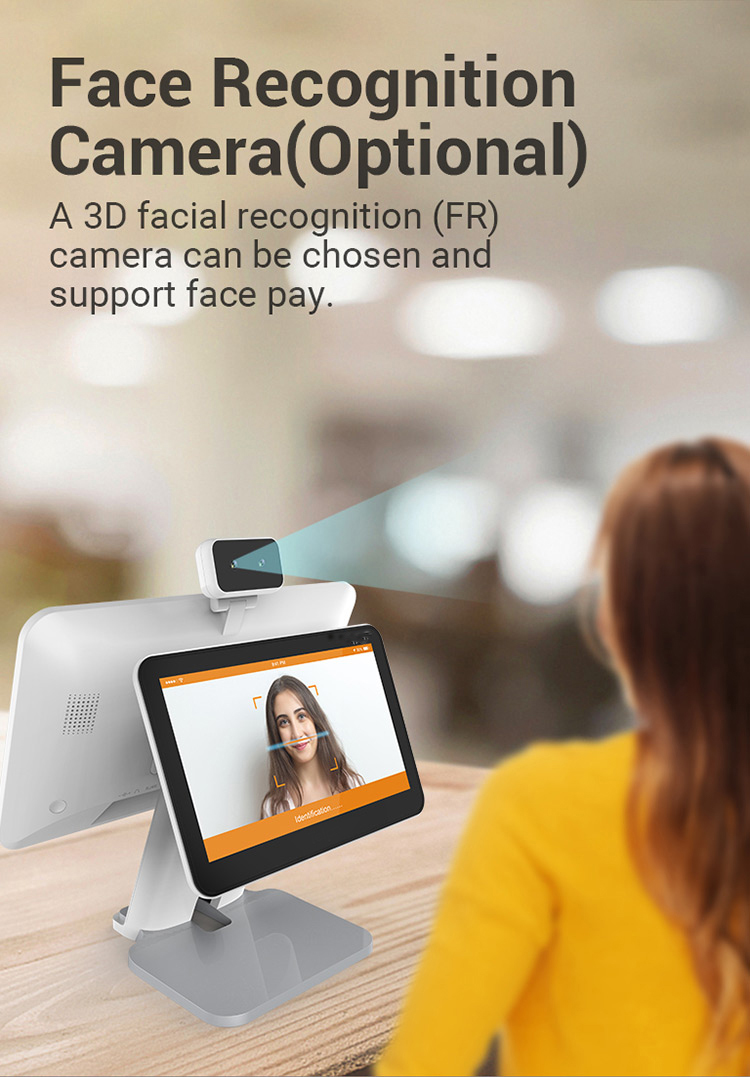
The POS platform can be configured with different camera options, including a single-lens camera, dual-lens camera, or 3D depth sensing camera.
Camera functionality can be useful when the POS application requires visual identification, scanning, customer interaction, or other camera-based functions.
Because camera requirements vary significantly between applications, businesses should define the required camera type and software compatibility during the hardware selection process.
The camera should not be considered a standard feature unless it is included in the selected configuration.
Optional MDM for Multi-Device Deployment
Managing multiple POS terminals can become difficult when each device must be configured and maintained manually.
The platform supports optional Mobile Device Management (MDM), which can be considered for businesses operating multiple POS devices or distributed locations.
An MDM solution can be useful for centralized device administration, application deployment, configuration management, and other operational tasks, depending on the selected MDM software.
For chain stores, franchise businesses, and multi-location deployments, centralized device management can help reduce the workload associated with maintaining POS hardware across different sites.
POS System for Different Business Environments
The flexible hardware configuration makes this Android POS terminal suitable for various commercial applications.
| Application | Potential POS Requirements | Suitable Configuration |
|---|---|---|
| Retail Store | Product lookup, checkout, inventory | Single or dual display |
| Restaurant | Order entry, menu management, checkout | Dual display option |
| Supermarket | Barcode scanning and peripheral integration | Enhanced configuration |
| Convenience Store | Compact checkout and wired networking | Standard configuration |
| Hospitality | Customer-facing interface and connectivity | Dual display |
| Chain Stores | Centralized device management | MDM option |
The actual suitability depends on the POS software, peripherals, network environment, and business workflow.
Android POS System vs. Consumer Tablet
A consumer tablet and a dedicated POS terminal may both run Android applications, but they are designed for different use cases.
| Consideration | Android POS Terminal | Consumer Tablet |
|---|---|---|
| Main Purpose | Commercial checkout | General consumer use |
| Display | 15.6-inch POS-oriented configuration | Varies by model |
| Counter Installation | Integrated stand-style design | Usually requires separate stand |
| POS Interfaces | Multiple dedicated interfaces | Often limited |
| Customer Display | Optional | Usually requires another device |
| Ethernet | Available | Model dependent |
| Cash Drawer Interface | RJ11 available | Usually requires adapter |
| MDM | Optional | Depends on device |
| Deployment | Designed for commercial environments | General-purpose |
For a business that only needs a simple tablet-based checkout application, a consumer tablet may be sufficient. For a dedicated checkout counter with multiple peripherals, a purpose-built POS system can offer a more suitable hardware architecture.
Designed for Flexible POS Software Integration
The terminal uses Android as its operating system, making it suitable for Android-compatible POS applications.
Before deployment, businesses should verify that their POS software supports the selected Android version and hardware configuration. Particular attention should be given to peripheral drivers, screen resolution, customer display support, camera functions, network interfaces, and application permissions.
For software providers and POS solution companies, hardware specifications should be matched with the software’s minimum and recommended requirements before mass deployment.
Compact Countertop Footprint
The complete device measures approximately 397 × 227 × 351 mm.
The countertop form factor provides a dedicated location for the POS terminal while maintaining space for other checkout equipment.
When planning installation, businesses should also consider the space required for power cables, Ethernet cables, USB peripherals, receipt printers, barcode scanners, cash drawers, and other connected devices.
A site assessment before deployment can help determine whether the selected configuration fits the available counter space.
Operating Environment
The POS system is designed for commercial indoor environments within its specified temperature range.
| Environmental Parameter | Specification |
|---|---|
| Operating Temperature | -5°C to 45°C |
| Storage Temperature | -25°C to 60°C |
| Power Supply | 12V / 3A |
| Dimensions | 397 × 227 × 351 mm |
For installations outside these environmental conditions, additional evaluation should be performed before deployment.
Certification and Commercial Deployment
The listed certifications include CE, BIS, and FCC.
These certifications can be important considerations when evaluating hardware for different regional markets. However, certification requirements may vary depending on the final configuration, destination country, wireless functions, and applicable regulations.
For commercial projects, buyers should request the relevant certification documents and verify that they correspond to the exact hardware configuration being supplied.
How to Select a POS Terminal
Choosing a POS system should start with the application rather than simply selecting the highest hardware specification.
Consider the following questions:
- Does the POS application require Android 7.1 or Android 9?
- Is a 15.6-inch main display suitable for the counter?
- Does the business need a customer-facing display?
- How much RAM and storage does the software require?
- Are USB, RJ11, and RJ45 interfaces required?
- Is wired Ethernet or wireless networking preferred?
- Does the application require LTE, GPS, or a camera?
- Will multiple POS terminals need centralized management?
- What certifications are required for the target market?
- What peripherals need to be connected at the checkout counter?
Answering these questions first can help avoid unnecessary hardware costs and compatibility issues.
Why Use a 15.6-Inch POS Terminal?
A larger display can be particularly useful for businesses with complex product catalogs, restaurant menus, multiple order lines, or detailed management interfaces.
The 1920 × 1080 resolution provides a Full HD working area for the POS application, while the larger screen can make buttons, product images, categories, and transaction information easier to arrange.
For compact checkout environments, businesses that prefer a smaller customer-facing display can choose the optional 10-inch configuration.
POS Hardware for OEM and Project-Based Applications
Different POS solution providers may have different requirements for memory, storage, customer displays, cameras, connectivity, and device management.
A configurable hardware platform can therefore be more practical than a fixed specification.
For OEM, system integrator, distributor, and project-based customers, the key consideration is to define the complete hardware configuration before production. This includes the Android version, processor configuration, RAM, storage, display options, camera, wireless connectivity, ports, MDM requirements, and required certifications.
The final configuration should be validated with the intended POS software and peripheral ecosystem.
Frequently Asked Questions
What is an Android POS system?
An Android POS system is a point-of-sale terminal that uses the Android operating system to run compatible checkout and business applications. It can combine a touchscreen display, network connectivity, and interfaces for POS peripherals in one commercial hardware platform.
What size is the main display?
The main display is 15.6 inches with a resolution of 1920 × 1080.
Does the POS terminal support a customer display?
Yes. Optional customer display configurations include an 11.6-inch display with 1366 × 768 resolution or above and a 10-inch display with 1024 × 600 resolution or above.
Can the POS system connect to a cash drawer?
The specification includes one RJ11 interface for compatible cash drawer connections. The exact cash drawer compatibility should be confirmed before deployment.
Does the POS terminal support Ethernet?
Yes. The terminal includes one RJ45 Ethernet interface in addition to Wi-Fi and Bluetooth connectivity.
Is LTE available?
LTE/WCDMA/GPRS is available as an optional configuration. Cellular availability should be confirmed for the target market and selected hardware version.
Does the POS system include a camera?
A camera is optional. Available configurations include single-lens, dual-lens, and 3D depth sensing camera options.
Does it support MDM?
Yes. Mobile Device Management is available as an optional feature for suitable multi-device deployments.
What operating systems are available?
The listed configurations include Android 7.1 and Android 9. The appropriate version should be selected according to the requirements of the POS application.
What are the dimensions of the POS terminal?
The listed dimensions are approximately 397 × 227 × 351 mm.
Build a POS Configuration for Your Application
A POS terminal should be selected as part of the complete checkout solution rather than as an isolated device.
This 15.6-inch Android POS system provides a combination of touchscreen operation, optional customer display, multiple connectivity interfaces, expandable hardware configurations, and optional MDM, camera, GPS, and cellular functions.
Whether the application is a retail checkout, restaurant ordering station, supermarket POS, convenience store terminal, or multi-location commercial deployment, the configuration can be selected according to the software and operational requirements.
For a project quotation, provide the required Android version, processor, RAM, storage, customer display, camera, connectivity, MDM, and target market. This allows the POS hardware configuration to be evaluated against the intended application before deployment.
Final Considerations Before Ordering
Before selecting this POS terminal for a commercial project, confirm the complete configuration with the supplier. In particular, verify the Android version, RAM and storage, customer display, camera requirements, network configuration, peripheral compatibility, MDM solution, and certification documents.
A correctly matched POS system can provide a more organized checkout environment and a practical hardware foundation for Android-based retail and commercial applications.
For businesses, POS solution providers, distributors, and system integrators, this configurable Android POS platform provides multiple hardware options that can be matched to different checkout and deployment requirements.
Contact DO RFID Group to discuss the required POS configuration and project requirements.