November 4, 2026
A dual display POS system combines a professional cashier terminal with a dedicated customer-facing screen in one compact countertop solution. This Android POS terminal is designed for retail stores, restaurants, grocery stores, convenience stores, and other businesses that need a clear operator display and an additional customer display.
The system features a 15.6-inch Full HD main display and supports an optional 10-inch or 11.6-inch customer display. Depending on the required configuration, businesses can choose Android 7.1 or Android 9, Quad-Core or Octa-Core processing, different memory and storage capacities, optional cameras, and multiple communication options.
With USB, RJ11, RJ45, audio, and Micro USB interfaces, the POS terminal can be configured for different retail and payment-counter environments. Optional LTE/WCDMA/GPRS, GPS, and Mobile Device Management (MDM) functions provide additional flexibility for specific deployment requirements.
Technical Specifications
| Dual Display POS System Retail Shop/Restaurant POS Grocery Cash Register | |
| Chipset | Android 7.1 |
| (alternative) | Quad-Core 1.6GHz |
| 2GB DDR, 8GB eMMC, Ext. TF card slot | |
| Android 9 | |
| Octa-Core 1.8GHz | |
| 2GB DDR, 16GB eMMC | |
| 4GB DDR, 64GB eMMC (Optional) | |
| Display | Main Display: 15.6-inch, 1920*1080 |
| Customer Display: 11.6-inch, 1366*768 or above(Optional) | |
| Customer Display: 10-inch, 1024*600 or above(Optional) | |
| Camera | Single-lens Camera (Optional) |
| Dual-lens Camera (Optional) | |
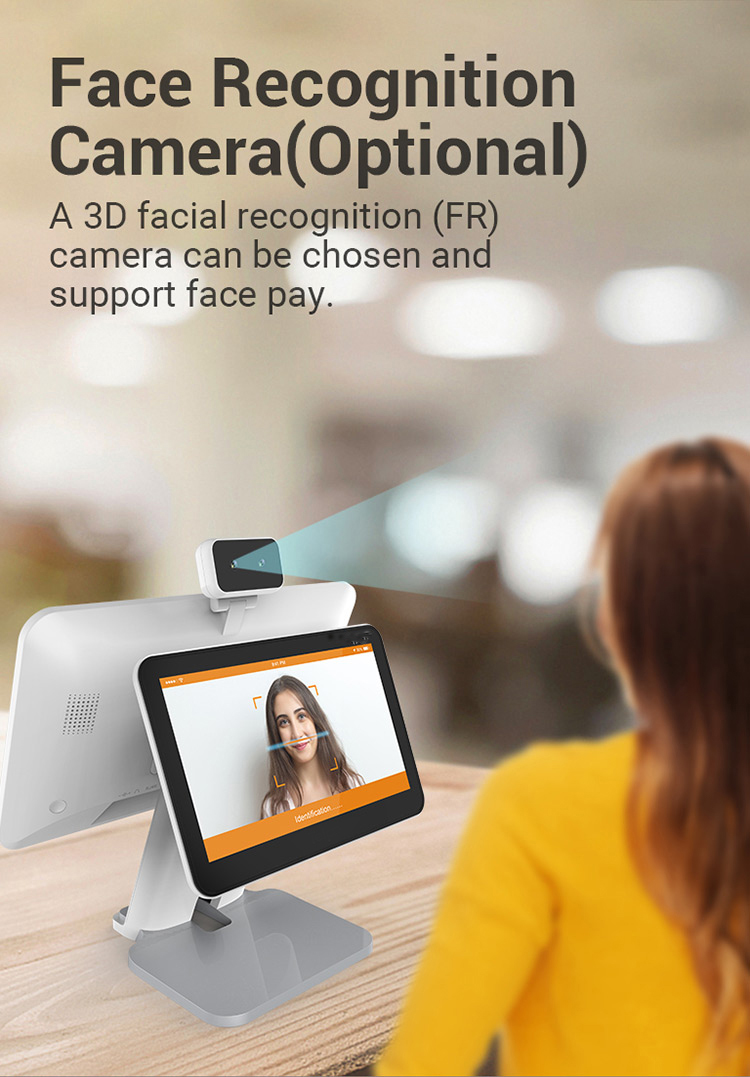
| 3D Depth Sensing Camera (Optional) | |
| Communications | WiFi/Bluetooth/Ethernet |
| LTE/WCDMA/GPRS (Optional) | |
| GPS (Optional) | |
| Peripheral Ports | 4 USB, 1 micro USB, 1 RJ11, 1 RJ45, 1 audio jack |
| Power Supply | 12V/3A |
| Others | 1 Power Key |
| Dimensions (mm) | 397 (L)*227 (W)*351 (H) |
| Environmental | Operating temperature: -5℃ ~ 45℃ |
| Storage temperature: -25℃ ~ 60℃ | |
| MDM (Optional) | Mobile Device Management |
| Certification | CE, BIS, FCC |
Key Features of the Dual Display POS System
15.6-Inch Full HD Main Display
The main POS terminal uses a 15.6-inch display with a 1920 × 1080 resolution. The large screen provides a practical interface for cashier operations, product selection, order management, and other POS software applications.
The Full HD resolution also makes text, product information, menus, and transaction details easier to view compared with smaller low-resolution POS terminals.
Optional Customer Display
The system supports two customer display configurations:
- 11.6-inch display with 1366 × 768 resolution or above
- 10-inch display with 1024 × 600 resolution or above
A customer-facing screen can be useful when businesses want customers to view order information, product details, or transaction information from the opposite side of the counter.
The customer display is optional, allowing businesses to select a configuration according to their counter space, application, and budget.
Android-Based POS Platform
The terminal supports Android 7.1 and Android 9 configurations. This provides flexibility for businesses and POS solution providers that require an Android-based hardware platform.
The available processor and memory configurations can also be selected according to application requirements, from a Quad-Core platform with 2GB RAM and 8GB storage to higher configurations using an Octa-Core processor, 4GB RAM, and 64GB eMMC storage.


POS Hardware Configuration Options
Different businesses have different requirements. A small retail counter may need a basic configuration, while a more demanding POS application may benefit from additional memory and storage.
| Configuration | Processor | RAM | Storage | Android |
|---|---|---|---|---|
| Standard | Quad-Core 1.6GHz | 2GB DDR | 8GB eMMC + TF card slot | Android 7.1 |
| Advanced | Octa-Core 1.8GHz | 2GB DDR | 16GB eMMC | Android 9 |
| High-Storage Option | Octa-Core 1.8GHz | 4GB DDR | 64GB eMMC | Android 9 |
The final hardware configuration can be selected according to the POS software, application workload, peripheral requirements, and deployment environment.
Main Display vs. Customer Display
A dual screen POS terminal separates the operator interface from the customer-facing interface. This can make the checkout counter more organized while giving customers a dedicated viewing area.
| Feature | Main Display | Customer Display |
|---|---|---|
| Screen Size | 15.6-inch | 10-inch or 11.6-inch |
| Resolution | 1920 × 1080 | 1024 × 600 or 1366 × 768 or above |
| Primary User | Cashier / Operator | Customer |
| Position | Operator side | Customer side |
| Purpose | POS operation | Customer-facing information |
The two displays serve different purposes rather than simply duplicating the same screen. Businesses can therefore design their POS interface according to the workflow of the cashier and customer.
Why Choose a Dual Screen POS Terminal?
A traditional single-screen POS terminal provides the cashier with one display, but customers may have limited visibility of the checkout process.
A dual display POS system adds a second screen without requiring a separate customer monitor. This integrated design can help businesses create a cleaner checkout area and provide customers with a dedicated display.
Integrated Countertop Design
The main display and customer display are combined into one POS hardware platform. This can reduce the need for separate display equipment and help maintain a consistent appearance at the checkout counter.
Flexible Customer Screen Options
Businesses can select either a 10-inch or 11.6-inch customer display according to available counter space and desired viewing area.
Multiple Connectivity Options
Wi-Fi, Bluetooth, and Ethernet are supported as standard communication options, while LTE/WCDMA/GPRS and GPS are available as optional configurations.
Peripheral Expansion
The terminal provides four USB ports, one Micro USB port, one RJ11 port, one RJ45 port, and one audio jack. These interfaces give POS integrators flexibility when connecting compatible peripherals and accessories.
Connectivity and Peripheral Interfaces
A POS terminal often needs to communicate with multiple devices. For this reason, interface selection is an important consideration when choosing POS hardware.
| Interface / Function | Quantity | Typical Purpose |
|---|---|---|
| USB | 4 | Connecting compatible POS peripherals |
| Micro USB | 1 | Device connection / service requirements |
| RJ11 | 1 | Compatible cash drawer or peripheral connection |
| RJ45 | 1 | Wired Ethernet networking |
| Audio Jack | 1 | Compatible audio accessories |
| Wi-Fi | — | Wireless network connection |
| Bluetooth | — | Wireless peripheral connectivity |
| LTE/WCDMA/GPRS | Optional | Mobile network connectivity |
| GPS | Optional | Location-related applications |
The exact peripheral compatibility depends on the POS software and connected device. Businesses should confirm interface requirements before placing a large-volume hardware order.
POS System for Retail Stores
Retail businesses often need a reliable checkout terminal that can fit naturally into a limited counter area.
The 15.6-inch main display provides a large working area for retail POS software, while the optional customer screen can provide a separate customer-facing interface.
The system can be considered for:
- Clothing and fashion stores
- Electronics shops
- Convenience stores
- Specialty retail
- Department stores
- Small and medium-sized retail counters
For retail deployments, the appropriate processor, memory, storage, customer display, and communication configuration should be selected based on the POS application.
POS Terminal for Restaurants
Restaurants can use a dual display POS terminal as part of an Android-based ordering and cashier solution.
The large main display can provide space for menu categories, products, orders, and checkout interfaces, depending on the installed POS software. The customer display can provide a separate viewing area at the payment counter.
Possible restaurant applications include:
- Quick-service restaurants
- Cafés
- Bakeries
- Food counters
- Casual dining businesses
- Takeaway stores
The hardware itself is a POS terminal platform, so restaurant-specific functions such as table management, kitchen display, loyalty programs, or payment processing depend on the software and peripherals integrated by the solution provider.
POS Cash Register for Grocery Stores
Grocery and convenience stores typically require a checkout system that can operate with different peripherals and networking methods.
This dual screen POS terminal provides multiple USB interfaces and an RJ11 port, giving integrators options for building a complete checkout station around compatible accessories.
For grocery applications, businesses can configure the terminal with an appropriate customer display, network connection, storage capacity, and peripheral setup.
Camera Options for POS Applications
The POS terminal supports several optional camera configurations:
| Camera Option | Availability |
|---|---|
| Single-Lens Camera | Optional |
| Dual-Lens Camera | Optional |
| 3D Depth-Sensing Camera | Optional |
Camera requirements can vary considerably between applications. A standard camera may be suitable for basic image capture, while dual-camera or 3D depth-sensing configurations may be selected for applications that require additional imaging capabilities.
Because camera functions depend on the installed software, businesses should define the required application before selecting a camera configuration.
Android POS System Configuration Comparison
Choosing the right hardware configuration is important for long-term POS deployment. The following table provides a simple way to compare the available configurations.
| Item | Basic POS | Standard Android POS | Higher-Performance Option |
|---|---|---|---|
| Android | 7.1 | 9 | 9 |
| CPU | Quad-Core 1.6GHz | Octa-Core 1.8GHz | Octa-Core 1.8GHz |
| RAM | 2GB | 2GB | 4GB |
| Storage | 8GB eMMC | 16GB eMMC | 64GB eMMC |
| TF Card | Supported | — | — |
| Best For | Basic POS applications | General POS deployment | More demanding software/storage requirements |
The table is intended as a hardware selection guide. Actual performance depends on the POS application, software optimization, connected peripherals, and operating environment.
Compact POS Hardware for Different Business Environments
The terminal measures 397 × 227 × 351 mm, making it suitable for countertop POS installations where an integrated dual-screen structure is preferred.
Its operating temperature range is -5°C to 45°C, while the storage temperature range is -25°C to 60°C.
These specifications should be considered when planning deployment locations, especially for businesses operating in environments with significant temperature variations.
MDM Support for POS Fleet Management
Mobile Device Management (MDM) is available as an optional function.
For businesses or solution providers managing multiple POS terminals, centralized device management can be an important consideration. MDM capabilities depend on the selected MDM solution and software configuration.
For multi-store deployments, customers should define their device management requirements during the hardware selection and project planning stage.
Certifications and Power Supply
The POS terminal uses a 12V/3A power supply and supports a range of deployment configurations.
The product is listed with the following certifications:
- CE
- FCC
- BIS
Certification requirements can vary depending on the target market, final configuration, and deployment environment. Customers should confirm the certification requirements for their specific country or project before ordering.
Who Is This Dual Display POS System For?
This POS terminal is suitable for businesses and POS solution providers looking for an Android-based dual-screen platform.
| Business Type | Potential Application |
|---|---|
| Retail Store | Checkout and customer-facing display |
| Restaurant | Ordering and cashier counter |
| Grocery Store | Checkout station |
| Convenience Store | Compact retail POS |
| Café | Counter ordering and payment |
| POS Integrator | Hardware platform for customized POS solutions |
| System Developer | Android POS hardware integration |
The terminal is particularly suitable when the project requires both an operator display and a dedicated customer display in an integrated form factor.
What to Consider Before Ordering
Selecting the correct POS configuration depends on more than screen size. Businesses should evaluate the following factors before placing an order.
1. POS Software Requirements
Confirm the Android version, processor, memory, storage, and peripheral requirements of the intended POS application.
2. Customer Display Size
Choose between the optional 10-inch and 11.6-inch customer displays according to the desired customer viewing area and available counter space.
3. Network Requirements
Wi-Fi, Bluetooth, and Ethernet are available. LTE/WCDMA/GPRS and GPS can be added when required by the project.
4. Peripheral Requirements
Review the required number and type of USB devices, cash drawers, printers, scanners, payment devices, and other accessories before finalizing the hardware configuration.
5. Camera Requirements
If the application requires imaging or depth sensing, select the appropriate single-lens, dual-lens, or 3D depth-sensing camera option.
Dual Display POS vs. Single Display POS
A dual display terminal is not automatically the best choice for every business. The main difference is whether a separate customer-facing screen is useful for the intended checkout workflow.
| Comparison | Single Display POS | Dual Display POS |
|---|---|---|
| Operator Screen | Yes | Yes |
| Customer Screen | Usually No | Yes |
| Customer-Facing Information | Limited | Dedicated display |
| Counter Integration | Simple | Integrated dual-screen design |
| Hardware Footprint | Generally smaller | Larger |
| Suitable For | Basic checkout | Customer-facing checkout workflows |
Businesses that only need a cashier interface may prefer a single-screen POS. Businesses that want a dedicated customer display can consider a dual-screen configuration.
Customization Options
The platform offers several configurable hardware options, allowing POS solution providers to create a configuration suited to different projects.
Available options include:
- Android 7.1 or Android 9
- Quad-Core or Octa-Core processor
- 2GB or 4GB RAM
- 8GB, 16GB, or optional 64GB storage
- 10-inch or 11.6-inch customer display
- Single-lens camera
- Dual-lens camera
- 3D depth-sensing camera
- Optional LTE/WCDMA/GPRS
- Optional GPS
- Optional MDM
For OEM or project-based deployments, customers should provide their software, peripheral, connectivity, and deployment requirements so the appropriate hardware configuration can be evaluated.
Frequently Asked Questions
What is a dual display POS system?
A dual display POS system is a point-of-sale terminal with a primary screen for the cashier or operator and a second screen facing the customer. It can be used in retail, restaurant, grocery, and other checkout environments.
What size is the main POS screen?
The main display is 15.6 inches with a 1920 × 1080 resolution.
What customer display options are available?
The system supports an optional 11.6-inch customer display with 1366 × 768 resolution or above, as well as an optional 10-inch display with 1024 × 600 resolution or above.
Does the POS terminal support Android?
Yes. The available configurations include Android 7.1 and Android 9.
How much RAM and storage are available?
The system can be configured with 2GB DDR memory. A 4GB DDR option is also available. Storage options include 8GB, 16GB, and an optional 64GB eMMC configuration.
Does it support Ethernet and Wi-Fi?
Yes. Wi-Fi, Bluetooth, and Ethernet are supported. LTE/WCDMA/GPRS is available as an optional communication configuration.
Can the POS terminal connect to peripherals?
The terminal provides four USB ports, one Micro USB port, one RJ11 port, one RJ45 port, and one audio jack. Peripheral compatibility should be confirmed according to the specific POS application.
Is a camera included?
The camera is optional. Available options include a single-lens camera, dual-lens camera, and 3D depth-sensing camera.
Does it support MDM?
Yes. Mobile Device Management is available as an optional function.
What industries can use this POS terminal?
The system can be considered for retail stores, restaurants, grocery stores, convenience stores, cafés, and other businesses requiring an Android-based POS terminal with an optional customer-facing display.
Build Your POS Solution Around the Right Configuration
A POS terminal should be selected according to the complete application rather than hardware specifications alone. Screen size, Android version, processor, memory, storage, connectivity, peripherals, cameras, and customer display requirements should all be considered before deployment.
This dual display POS system provides a flexible hardware platform for retail, restaurant, grocery, and customized POS projects. With multiple display, processor, storage, communication, camera, and peripheral options, businesses and POS solution providers can select a configuration that matches their application requirements.
If you are developing a new POS project, deploying terminals across multiple stores, or looking for an Android dual screen POS hardware platform, contact us with your required software, peripherals, display configuration, and target market. Our team can help evaluate a suitable hardware configuration for your project.