November 4, 2026
Upgrade your checkout experience with our dual screen POS terminal, an Android-based point of sale system designed for retail stores, supermarkets, restaurants, and other commercial environments. Featuring a 15.6-inch Full HD touchscreen, flexible customer display options, and an integrated thermal printer configuration, this POS cash register combines transaction management, customer interaction, and receipt printing in one compact workstation.
At DO RFID, we provide flexible POS hardware solutions for businesses, system integrators, distributors, and software developers. Our C1 POS terminal supports multiple hardware configurations, including different processors, memory capacities, display combinations, and optional connectivity features. With Android compatibility, peripheral interfaces, and SDK development support, we help our customers build checkout systems that fit their operational requirements.
Whether you are upgrading an existing checkout counter or developing a customized point of sale solution, our dual screen Android POS terminal offers a practical hardware platform for efficient daily operations.

Android POS register machine C1 adopts up to Android 9.0 system, dual-core processor, and large capacity memory to ensure faster system operation, stronger expansibility and better user experience.
Product Specifications
| Category | Optional Configuration |
| Screen Size | ① Single display: 15.6-inch HD capacitive screen, 1920 × 1080 resolution |
| ② Dual display: 15.6-inch + 10.1-inch | |
| ③ Dual display: 15.6-inch + 11.6-inch | |
| ④ Dual display: 15.6-inch + 15.6-inch | |
| ⑤ Dual display: 15.6-inch + LED | |
| Function | ① Built-in thermal printer: 80mm / 58mm paper width |
| ② Face recognition camera: Single-lens / Dual-lens / 3D Depth Sensing Camera | |
| ③ Voice interaction and voice translation available | |
| Color | White / Black |
| Service | ① ODM supported |
| ② Free SDK for software development | |
| ③ MDM (Mobile Device Management) service supported | |
| ④ Samples in stock, fast shipment after payment succeeded |
| RK Scheme | OS: Android 9 Processor: Quad-core 1.4GHZ+Dual core1.8GH |
| Qualcomm Scheme | OS: Android 10 Processor: Octa-core 1.8GHZ |
| Memory | 2GB DDR, 8GB eMMC, Ext. TF card slot 2GB DDR,16GBeMMC(Optional) 4GB DDR,64GBeMMC(Optional) |
| Display | 4 Options: 1/ 15.6-inch+15.6-inch, 1920*1080; 2/ 15.6-inch+Nixie tube, 1920*1080; 3/ 15.6-inch+10.1-inch, Main Display:1920*1080 4/ Single Display: 15.6-inch, 1920*1080; |
| Camera | Single-lens Camera Dual-lens Camera(Optional) 3D Depth Sensing Camera |
| Printer | Paper width 58mm, Φ50mm Paper width 80mm(Optional) |
| Communications | WiFi/BT/Ethernet 4G(Optional) GPS(Optional) |
| Audio | Digital Audio Speaker Microphone |
| Peripheral Ports | 4*USB, 1*Micro USB, 1*RJ11, 1*RJ12, 1*RJ45, 1*Audio Jack |
| Power Supply | 24V/2.5A |
| Others | 1 Power Key |
| MDM (Optional) | Mobile Device Management |
Key Features of Our Dual Screen POS Terminal
Our C1 POS terminal combines essential checkout functions with flexible hardware options, helping businesses create a more organized and professional point of sale environment.
- 15.6-inch Full HD touchscreen: A 1920 × 1080 resolution display provides a clear interface for product selection, order management, and cashier operations.
- Dual screen configurations: Choose a customer-facing display to present transaction information, product details, or promotional content.
- Android operating system: Android 9 and Android 10 configurations support compatible POS applications and customized software solutions.
- Integrated thermal printing: Configure the terminal with a 58 mm thermal printer or an optional 80 mm printer for receipt printing.
- Flexible hardware platforms: Select from available Rockchip-based and Qualcomm-based processor configurations.
- Expandable memory options: Choose memory and storage combinations to suit your POS software and application requirements.
- Multiple connectivity options: Wi-Fi, Bluetooth, and Ethernet support convenient connections to compatible peripherals and business networks.
- Rich peripheral interfaces: USB, RJ45, RJ11, RJ12, and audio interfaces facilitate integration with compatible retail equipment.
- Customization support: We provide hardware configuration options and SDK development support for project-specific applications.


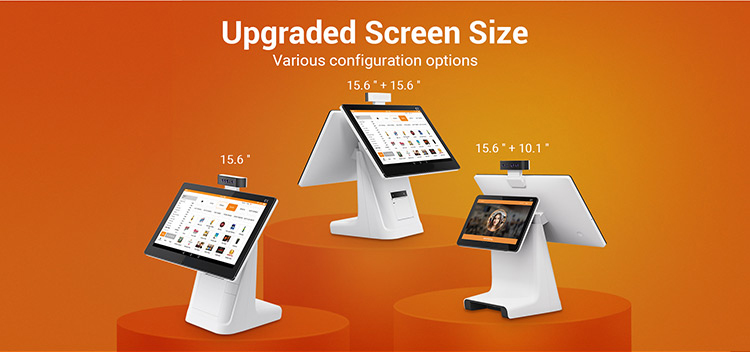


Dual Screen POS Terminal for Better Customer Interaction
A dual screen POS terminal creates a more interactive checkout experience by separating the cashier interface from the customer-facing display. Cashiers can operate the POS software on the main touchscreen while customers view relevant information on the secondary screen.
This arrangement helps businesses organize checkout operations and present transaction details in a clear, professional format.
Main Screen for Cashier Operations
The 15.6-inch Full HD touchscreen provides a spacious working area for compatible POS applications. Its 1920 × 1080 resolution supports detailed menus, product lists, transaction information, and management interfaces.
The large screen is suitable for checkout counters where staff regularly process orders, manage products, and access sales functions throughout the day.
Secondary Screen for Customer Display
The secondary display can be configured according to the selected model. Depending on the software and display setup, businesses can use it to present order totals, product information, customer messages, or promotional materials.
For retailers and restaurants, a customer-facing display also helps create a more organized counter layout and gives customers a dedicated viewing area during checkout.
Available Screen Configurations
We offer several display combinations to accommodate different counter sizes and customer interaction requirements.
| Display configuration | Main application | Key advantage |
|---|---|---|
| 15.6-inch single screen | Basic checkout stations | Simple, space-efficient operation |
| 15.6 + 10.1-inch dual screen | Retail stores and small counters | Compact customer-facing display |
| 15.6 + 11.6-inch dual screen | Retail and service counters | Balanced screen size for both users |
| 15.6 + 15.6-inch dual screen | Supermarkets and premium checkout areas | Large viewing area for cashier and customer |
| 15.6-inch screen with LED display | Counters requiring simple numeric information | Straightforward transaction value display |
The best configuration depends on the available counter space, POS application layout, and the information you want to show customers. Our team can help you select a suitable screen combination for your project.
Processor and Memory Options
Different POS applications have different processing and storage requirements. Our C1 platform provides multiple hardware configurations, allowing businesses to balance application performance, storage capacity, and deployment costs.
Processor Comparison
| Processor platform | Configuration | Suitable applications |
|---|---|---|
| Rockchip-based option | Quad-core 1.4 GHz + dual-core 1.8 GHz, as described for the available platform | Standard POS applications and routine checkout workflows |
| Qualcomm-based option | Octa-core 1.8 GHz | Compatible applications requiring a different processing platform |
The available processor platform can influence application compatibility, system performance, and integration requirements. We recommend selecting the platform according to your POS software, peripheral connections, and expected workload.
Memory and Storage Comparison
| Memory and storage | Typical application profile | Main benefit |
|---|---|---|
| 2 GB RAM + 8 GB storage | Basic POS deployments | Entry-level hardware configuration |
| 2 GB RAM + 16 GB storage | POS applications requiring additional local storage | More room for application files and data |
| 4 GB RAM + 64 GB storage | More demanding compatible applications | Greater memory and storage capacity |
These options allow system integrators and resellers to develop product packages for different customer segments. Our team can help match the hardware configuration to your application requirements.
Android POS System for Flexible Software Integration
Our Android POS terminal provides a hardware platform for compatible point of sale applications. Android-based systems are useful for businesses that want to deploy tailored interfaces, connect compatible business applications, or integrate POS functions into an existing retail workflow.
Typical software functions may include:
- Product browsing and item selection.
- Order creation and transaction management.
- Receipt generation through a compatible printer.
- Customer-facing product and order information.
- Inventory and sales interfaces provided by the selected software.
- Integration with compatible business management systems.
- Customized application interfaces for specialized commercial projects.
We also provide SDK development support to help software developers work with supported hardware functions. This makes the terminal suitable for businesses that require a customized checkout interface or want to develop a dedicated POS application.
The final software experience depends on the application installed and the selected hardware configuration. Our team can work with your project requirements to identify an appropriate development approach.
Built-in Thermal Printer for Efficient Receipt Printing
A thermal printer is a practical feature for a commercial POS workstation. It allows compatible checkout software to generate transaction receipts without requiring a separate printer on the counter.
Our C1 terminal supports a 58 mm thermal printer configuration, with an optional 80 mm printer available for projects that require a wider receipt format.
| Printer option | Key characteristic | Recommended application |
|---|---|---|
| 58 mm thermal printer | Compact receipt format | Small retail counters, kiosks, and compact checkout stations |
| 80 mm thermal printer | Wider receipt format | Retail stores and applications requiring more receipt space |
Thermal printing is widely used for receipts because it does not require conventional ink cartridges. With compatible software and receipt formatting, businesses can print transaction summaries and other supported checkout information.
When planning your configuration, consider receipt width, expected transaction volume, available counter space, and the printer interface required by your POS application.
Connectivity and Peripheral Expansion
A commercial POS system often needs to communicate with networks, printers, cash drawers, and other checkout peripherals. Our terminal provides a range of interfaces to support integration with compatible equipment.
| Interface or feature | Typical purpose |
|---|---|
| USB ports | Connect compatible peripheral devices |
| Micro USB | Supported device connection or service functions |
| RJ45 Ethernet | Wired network connectivity |
| RJ11 / RJ12 | Connect compatible cash drawers or peripheral equipment |
| Wi-Fi | Wireless network access |
| Bluetooth | Connect supported wireless peripherals |
| Audio interface | Connect compatible audio accessories |
| Optional 4G | Mobile network connectivity |
| Optional GPS | Positioning functions for supported applications |
The available interface combination helps system integrators design a POS workstation around their preferred peripherals and network architecture.
For example, a retail counter may use Ethernet for network communication, a compatible cash drawer for cash handling, and the integrated thermal printer for receipts. A deployment in a temporary or mobile business environment may benefit from an optional wireless connectivity configuration.
Camera and Audio Options
Beyond conventional checkout functions, our POS platform offers optional camera and audio configurations for projects with additional application requirements.
| Option | Potential application |
|---|---|
| Single camera | Applications requiring basic image capture |
| Dual camera | Compatible applications using two camera modules |
| 3D depth camera | Applications designed for depth-sensing functions |
| Built-in speaker | Audio prompts and supported multimedia functions |
| Microphone | Voice input for compatible applications |
These options give software developers additional flexibility when designing specialized commercial applications.
For example, a customized application may use a camera for image capture or integrate audio prompts into a customer workflow. Depth-sensing functions depend on the selected camera hardware and compatible software.
Applications Across Multiple Industries
Our dual screen Android POS terminal is designed for a variety of commercial checkout environments.
Retail Stores
Retailers can use the large touchscreen for product selection, order processing, and compatible inventory or sales applications. The secondary display creates a dedicated customer viewing area.
Supermarkets and Convenience Stores
The POS terminal provides a centralized workstation for checkout operations. Its integrated printer option and peripheral interfaces support a more organized checkout counter.
Restaurants and Cafés
Restaurants can deploy compatible POS software for order entry, menu selection, and transaction management. The dual screen design helps separate staff operations from customer-facing information.
Specialty Shops
Electronics stores, clothing retailers, gift shops, and other specialty businesses can configure the terminal around their product catalog and checkout workflow.
Service Businesses
Salons, repair shops, ticket counters, and other service providers can use compatible applications to manage transactions and display customer information.
System Integrators and POS Resellers
Distributors and solution providers can select suitable processor, memory, screen, and printer combinations to build POS packages for their target markets.
Why Choose Our Dual Screen Android POS Terminal?
We focus on providing flexible hardware options for businesses that need a practical foundation for commercial checkout systems.
Flexible display selection
We offer single-screen and dual-screen configurations to accommodate different counter layouts and customer interaction requirements.
Multiple hardware configurations
Our processor and memory options allow businesses to choose a suitable platform for their intended POS software.
Integrated printing options
The available 58 mm and 80 mm thermal printer configurations help simplify checkout workstation design.
Connectivity for commercial environments
USB, network, audio, and peripheral interfaces support integration with compatible devices.
Software development support
Our SDK resources help developers build applications around supported hardware functions.
Customization for business projects
We support OEM/ODM-oriented project discussions, enabling distributors and integrators to explore hardware configurations suited to their product requirements.
Professional B2B cooperation
We work with businesses that need POS hardware for distribution, retail deployment, software integration, and customized commercial projects.
OEM and ODM Customization Services
Every POS deployment has its own requirements. A retailer may prioritize a compact footprint, while a system integrator may need specific memory, camera, or peripheral configurations.
We provide customization support to help customers develop a POS solution aligned with their intended application.
Available project options include:
- Hardware configuration: Select from supported processor, memory, storage, display, and printer options.
- Display configuration: Choose a suitable main and secondary screen combination.
- Peripheral integration: Plan connections for compatible cash drawers, printers, and other devices.
- Software development: Use available SDK resources to develop supported application functions.
- Device management: Explore optional MDM functionality for compatible deployment requirements.
- Commercial customization: Discuss project-specific product configurations and deployment needs.
For OEM and ODM projects, we recommend sharing your application requirements, estimated order quantity, preferred specifications, and target market. This helps us identify a suitable configuration and prepare a more relevant proposal.
How to Select the Right POS Configuration
Choosing the right POS terminal starts with understanding your daily operations and software requirements.
| Selection factor | Questions to consider | Our recommendation |
|---|---|---|
| Screen layout | Do you need a customer-facing display? | Choose a single or dual screen configuration |
| Processing platform | What processor does your software support? | Match the platform to application requirements |
| Memory | How much memory does your software require? | Select a suitable RAM configuration |
| Storage | How much local storage will applications need? | Choose 8 GB, 16 GB, or 64 GB as appropriate |
| Receipt printing | Which receipt width does your business use? | Select the 58 mm or 80 mm option |
| Network | Will the terminal use wired or wireless networking? | Choose the appropriate connectivity configuration |
| Peripherals | Do you need a cash drawer or additional equipment? | Review the interface requirements |
| Software integration | Will you use existing software or develop a custom application? | Evaluate Android compatibility and SDK support |
By reviewing these factors before ordering, businesses can create a configuration that better fits their operational workflow and deployment budget.
Frequently Asked Questions
Q1: What is a dual screen POS terminal?
A dual screen POS terminal is a point of sale computer with a primary screen for cashier operations and a secondary display for customer-facing information. It helps businesses separate staff controls from the customer viewing area.
Q2: Does this POS terminal support Android?
Yes. Our C1 platform offers Android 9 and Android 10 configurations, depending on the selected hardware platform. It is designed for compatible POS applications and customized software projects.
Q3: What screen sizes are available?
The main screen is 15.6 inches with a 1920 × 1080 resolution. Secondary display options include 10.1-inch, 11.6-inch, and 15.6-inch configurations, as well as an LED display option.
Q4: Does the POS cash register include a printer?
The terminal supports an integrated thermal printer configuration. Customers can select a 58 mm printer or an optional 80 mm printer according to their receipt requirements.
Q5: Can I customize the memory and storage?
Yes. Available configurations include 2 GB RAM with 8 GB storage, 2 GB with 16 GB, and 4 GB with 64 GB. We can help you select an appropriate configuration for your intended application.
Q6: Can developers create their own POS software?
Yes. We provide SDK development support for compatible hardware functions. Developers can use these resources to build customized applications based on the supported platform and their software requirements.
Q7: Can the terminal connect to a cash drawer?
The terminal includes RJ11 and RJ12 interfaces for compatible peripheral equipment. The connection method depends on the cash drawer and its interface requirements.
Q8: Is Wi-Fi available?
Yes. Wi-Fi and Bluetooth are listed among the connectivity options. Ethernet is also available, and 4G can be selected for suitable configurations.
Q9: Can I order customized POS terminals in bulk?
We support B2B project discussions for distributors, resellers, and system integrators. Share your preferred configuration, application requirements, and estimated order quantity so we can help you plan the project.
Q10: How do I request a quotation?
Contact our team with your required screen combination, processor platform, memory, printer option, connectivity requirements, and estimated quantity. We can then discuss a suitable configuration and quotation for your project.
Request a Quote for Your POS Terminal Project
Looking for a dual screen POS terminal for your retail business, restaurant, or commercial software project? Our C1 Android POS platform offers flexible display options, multiple hardware configurations, thermal printing choices, and development support for compatible applications.
We welcome inquiries from POS distributors, hardware resellers, retail solution providers, and software developers.
Contact us today to discuss your requirements. Please include your preferred screen configuration, processor, memory and storage, printer width, connectivity options, target application, and order quantity. Our team will help you identify a suitable POS terminal configuration for your business.