October 21, 2026
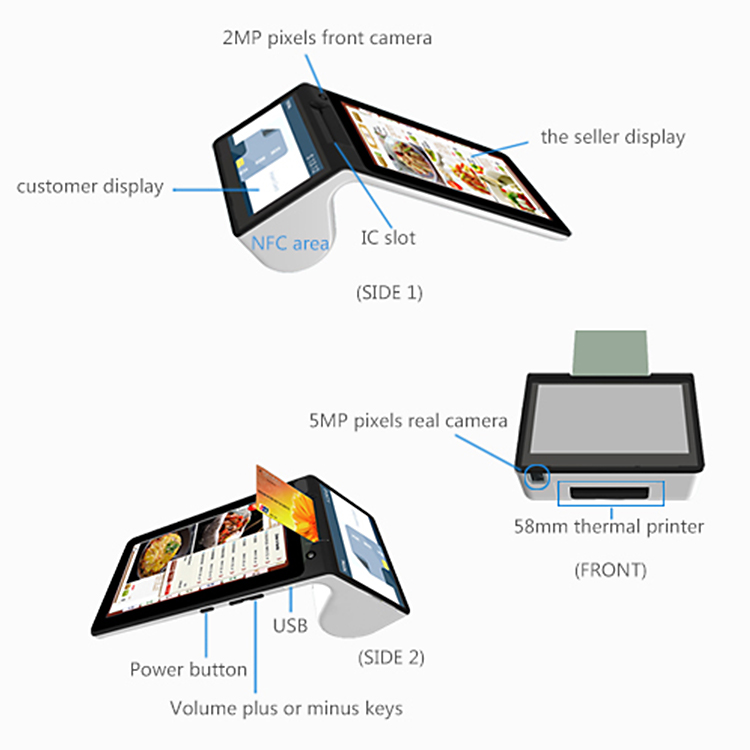
Built-in thermal printer, printing receipts,barcode and Qrcode
58mm line printing, printing speed reaches 80mm/s.
| CPU | AD500A Quad-Cord ARMV7 Processor 1.1GHz | |
| OS | Android 5.1 | |
| Intenal memory | 1GB RAM+8GB ROM | |
| Display screen | Main screen | 7 inch color TFT LCD screen,1024*600 |
| Deputy screen | 4.3 inch,480*272 | |
| Printer | 58mm thermal printer,80mm/s | |
| 2G | GSM 850/900/1800/1900 | |
| 3G | WCDMA 2100MHz | |
| WiFi | IEEE802.11b / IEEE802.11g | |
| GPS | Built-in GPS Support A-GPS | |
| NFC | 13.56MHz,ISO14443A/B,ISO15693 protocol | |
| Scan Camera | Dual camera,front camera 2.0MP,real camera 5.0MP(optional) | |
| PSAM encryption | Contact mode for read and write,support IOS7816- | |
| 1/2/3 agreement,can read and write S50,S60,S70 | ||
| card,ect. | ||
| Payment | Chip Card ,Scan code to pay | |
| Bluetooth | Bluetooth 2.0 / 4.0 (optional) | |
| Scanner | Barcode scanner / Qrcode scanner | |
| Power | Power Inteface | Micro USB |
| Battery | 1 built-in 2100mAH 7.4V lithium battery | |
| Language | Chinese and English(android support multi-language) | |
| Interface | 1*Micro USB | |
| TF card | A TF Card slot,max 32GB | |
| Button | A reset button | |
| Size and weight | Product size:248*115*82mm | |
| The weight of the machine:0.475kg |
Product Description
android pos terminal/android pos terminal with printer
900 Android intelligent terminal, the mobile cash register terminal, smart POS terminal, Android payment terminals, a set of payments, printer, scanner, camera, voice calls, NFC reading in one mobile intelligent POS terminal, has good expansion function, support China Unicom 3G, Bluetooth, WiFi, PSAM encryption, NFC payment, two-dimensional code scanning, fingerprint recognition, identification
1. The future on your counter top
The PC900 Smart Terminal is a future-proof device that accepts magnetic stripe, EMV (also known as chip cards), NFC, Bluetooth and QR code payment technologies. You are ready to accept your customers’ favorite payment methods: Apple Pay, chip-and-pin, mobile apps, and whatever else the future brings.
2. Fully secure
Purpose-built from the ground up with your and your customers’ security and privacy as a priority. The PC900 Smart Terminal meets the highest PCI and EMV requirements, comes with 24/7 fraud and tamper detection, and uses state-of-the-art, end-to-end encryption technologies.
3. All-in-one, plays well with others
Arrives ready to go with a built-in payment terminal, register, scanner, printer, and more. Or it can work seamlessly with the equipment you already own. You don’t even need to switch banks.
4. The beginning of a new ecosystem.
The great hardware comes great software. PC900 gives merchants the flexibility and control to use 3rd party applications to save time, make more money, and deliver capabilities that catapult your business into the future.
In today’s fast-paced digital economy, businesses are under constant pressure to provide faster checkout experiences, support multiple payment methods, improve operational efficiency, and deliver superior customer service. Traditional cash registers and desktop point-of-sale systems are gradually being replaced by more flexible, intelligent, and mobile solutions.
One of the fastest-growing technologies in the payment industry is the Portable Android Mobile POS with Built-in Printer. These compact, all-in-one payment devices combine payment processing, receipt printing, inventory management, customer data collection, and business analytics into a single handheld terminal.
From retail stores and restaurants to logistics companies, supermarkets, delivery services, healthcare providers, and field sales teams, mobile POS terminals have become an essential tool for businesses seeking mobility, efficiency, and digital transformation.
This comprehensive guide explores everything you need to know about mobile POS terminals, including their working principles, technical specifications, business benefits, applications, pain points solved, competitive analysis, and how to choose the right Android POS solution for your business.
What Is a Mobile POS Terminal?
A Mobile POS Terminal (mPOS) is a portable electronic payment device that enables merchants to accept payments, print receipts, manage transactions, and access business applications from virtually anywhere.
Unlike traditional POS systems that are fixed at checkout counters, mobile POS terminals are lightweight, wireless, and battery-powered.
A modern Android mobile POS terminal typically combines:
- Touchscreen display
- Android operating system
- Payment processor
- Thermal receipt printer
- Barcode scanner
- NFC reader
- Wi-Fi connectivity
- Bluetooth connectivity
- 4G/5G communication
- Camera module
- Battery system
The result is a complete business management platform in a handheld device.
What Is a Portable Android Mobile POS with Built-in Printer?
A Portable Android Mobile POS with Built-in Printer is an all-in-one smart payment terminal powered by the Android operating system.
The built-in thermal printer allows merchants to generate receipts instantly without requiring external printing devices.
Key functions include:
- Credit card payments
- Debit card payments
- Contactless payments
- QR code payments
- Mobile wallet acceptance
- Receipt printing
- Inventory tracking
- Customer management
- Sales reporting
- Order processing
This makes it ideal for businesses that require mobility and real-time transaction processing.
How Does a Mobile POS Terminal Work?
Understanding the working principle helps businesses appreciate the advantages of mobile POS technology.
Step 1: Product Selection
The merchant selects products or services on the POS interface.
Step 2: Transaction Creation
The system calculates:
- Item prices
- Taxes
- Discounts
- Total amount
Step 3: Payment Processing
Customers can pay using:
- Credit cards
- Debit cards
- NFC cards
- Mobile wallets
- QR codes
- Digital payments
Step 4: Data Encryption
Payment information is encrypted before transmission.
Step 5: Payment Authorization
The payment gateway communicates with:
- Banks
- Card networks
- Payment processors
Step 6: Transaction Approval
Once approved, the transaction is completed.
Step 7: Receipt Printing
The built-in thermal printer instantly generates a receipt.
Step 8: Data Synchronization
Sales data is uploaded to cloud-based management systems.
Main Components of an Android Mobile POS Terminal
Touchscreen Display
Usually ranges from:
- 5 inches
- 5.5 inches
- 6 inches
Provides intuitive user interaction.
Android Operating System
Advantages include:
- Familiar interface
- App ecosystem
- Easy updates
- Custom software development
Thermal Printer
Produces receipts without ink cartridges.
Benefits include:
- Fast printing
- Low maintenance
- Lower operating costs
Card Reader
Supports:
- Magnetic stripe cards
- EMV chip cards
- Contactless cards
NFC Module
Enables tap-to-pay transactions.
Barcode Scanner
Supports:
- Retail inventory management
- Logistics operations
- Ticket validation
Battery System
Provides all-day operation.
Wireless Connectivity
Includes:
- Wi-Fi
- Bluetooth
- 4G LTE
- Optional 5G
Common Pain Points Solved by Mobile POS Terminals
Pain Point 1: Long Checkout Queues
Traditional checkout counters create bottlenecks.
Solution:
Mobile POS devices allow staff to process transactions anywhere.
Pain Point 2: Limited Payment Options
Customers increasingly expect flexible payment methods.
Solution:
Mobile POS terminals support:
- Credit cards
- Mobile wallets
- NFC payments
- QR codes
Pain Point 3: High Hardware Costs
Traditional POS systems require multiple devices.
Solution:
An Android POS combines everything into one terminal.
Pain Point 4: Poor Mobility
Fixed POS systems restrict staff movement.
Solution:
Portable devices enable transactions anywhere.
Pain Point 5: Inventory Management Challenges
Manual tracking creates errors.
Solution:
Integrated scanners update inventory automatically.
Pain Point 6: Receipt Printing Difficulties
External printers add complexity.
Solution:
Built-in printers streamline operations.
Key Features of Portable Android POS Terminals
All-in-One Design
Combines multiple business functions into a single device.
Real-Time Data Access
Managers can monitor sales instantly.
Cloud Integration
Data synchronization improves visibility.
Multi-Payment Acceptance
Supports global payment methods.
Custom Application Support
Businesses can install industry-specific apps.
Portable Operation
Ideal for mobile workforces.
Technical Specifications
Typical Android POS terminal specifications include:
| Specification | Typical Value |
|---|---|
| Operating System | Android 10/11/12 |
| CPU | Quad-Core or Octa-Core |
| RAM | 2GB–4GB |
| Storage | 16GB–64GB |
| Display | 5–6 Inch Touchscreen |
| Printer | 58mm Thermal Printer |
| Printing Speed | 70–100 mm/s |
| NFC | Supported |
| Bluetooth | Supported |
| Wi-Fi | Supported |
| 4G LTE | Supported |
| Camera | 5MP–13MP |
| Battery | 5000–7000mAh |
Industries Using Mobile POS Terminals
Retail Stores
The largest market segment.
Applications include:
- Checkout processing
- Inventory management
- Customer loyalty programs
Restaurants
Used for:
- Table-side ordering
- Bill payments
- Delivery services
Supermarkets
Improve checkout speed.
Logistics Companies
Enable proof-of-delivery collection.
Transportation
Ticketing and fare collection.
Healthcare
Patient registration and billing.
Hospitality
Hotels use mobile POS systems for guest services.
Field Sales Teams
Process orders directly at customer locations.
Advantages of Android-Based POS Systems
Open Platform
Android allows customization and app integration.
Cost Efficiency
Lower development costs compared to proprietary systems.
User Familiarity
Employees learn faster.
Software Flexibility
Supports third-party applications.
Future Scalability
Easy upgrades and feature expansion.
Mobile POS Terminal vs Traditional POS System
Mobility
Traditional POS:
Fixed location.
Mobile POS:
Portable.
Winner: Mobile POS
Hardware Requirements
Traditional POS:
Multiple devices.
Mobile POS:
Single device.
Winner: Mobile POS
Installation Cost
Traditional POS:
Higher.
Winner: Mobile POS
Transaction Speed
Both perform well.
Tie
Business Flexibility
Mobile POS:
Far superior.
Winner: Mobile POS
Mobile POS Terminal vs Cash Register
Payment Capabilities
Cash Register:
Limited.
Mobile POS:
Comprehensive.
Winner: Mobile POS
Data Analytics
Cash Register:
Minimal.
Mobile POS:
Advanced.
Winner: Mobile POS
Inventory Tracking
Cash Register:
Manual.
Mobile POS:
Automated.
Winner: Mobile POS
Cloud Connectivity
Cash Register:
Usually unavailable.
Mobile POS:
Integrated.
Winner: Mobile POS
New Generation Android POS vs Older POS Systems
Traditional POS Systems
Features:
- Limited mobility
- Proprietary software
- Basic payment functions
Advantages:
- Stable operation
Modern Android POS Devices
Features:
- Cloud connectivity
- NFC payments
- QR code support
- App ecosystem
- Built-in printing
- Real-time analytics
Advantages:
- Greater flexibility
- Better scalability
- Enhanced user experience
Security Features
Security is critical in payment processing.
EMV Certification
Supports chip card security standards.
PCI Compliance
Protects payment card information.
Data Encryption
Secures transactions.
Secure Elements
Protect cryptographic keys.
Fingerprint Authentication
Available on some models.
Remote Device Management
Allows centralized control.
How Mobile POS Improves Customer Experience
Faster Transactions
Reduces waiting times.
Flexible Payment Methods
Customers choose preferred payment options.
Instant Receipts
Immediate proof of purchase.
Personalized Service
Staff can assist customers anywhere.
Improved Accuracy
Reduces billing errors.
How Mobile POS Improves Business Operations
Better Inventory Visibility
Real-time stock tracking.
Improved Employee Productivity
Less time spent on manual processes.
Faster Reporting
Instant sales analytics.
Lower Operating Costs
Fewer hardware requirements.
Enhanced Mobility
Supports remote and field operations.
How to Choose the Best Portable Android POS Terminal
Evaluate Payment Requirements
Ensure support for:
- EMV
- NFC
- QR payments
Check Printer Performance
Consider:
- Speed
- Reliability
- Paper compatibility
Assess Connectivity Options
Look for:
- Wi-Fi
- Bluetooth
- 4G LTE
Review Battery Capacity
Long battery life is essential.
Verify Software Compatibility
Ensure compatibility with business applications.
Examine Security Certifications
Choose certified devices.
OEM and Customization Options
Manufacturers often provide:
Custom Branding
Company logos and colors.
Custom Software
Industry-specific applications.
Hardware Modifications
Additional modules and accessories.
Private Label Solutions
Ideal for distributors and payment service providers.
Future Trends in Mobile POS Technology
AI-Powered Analytics
Smarter business insights.
Cloud-Native Platforms
Enhanced scalability.
5G Connectivity
Faster transaction processing.
Biometric Security
Fingerprint and facial recognition.
Contactless-First Payments
Growing consumer preference.
Omnichannel Commerce
Integration between online and offline sales.
Competitive Analysis: Is a Portable Android Mobile POS with Built-in Printer Worth It?
Compared with traditional POS systems, desktop terminals, and cash registers, Android mobile POS terminals provide significant advantages.
Key benefits include:
- Mobility
- Integrated printing
- Lower hardware costs
- Real-time analytics
- Cloud connectivity
- Flexible payment acceptance
- Improved customer experience
For retailers, restaurants, logistics companies, service providers, and growing businesses, the return on investment is often substantial due to increased efficiency and enhanced customer satisfaction.
Conclusion
Portable Android Mobile POS Terminals with Built-in Printers represent the future of payment processing and business management. By combining payment acceptance, receipt printing, inventory tracking, customer management, and cloud connectivity into a single handheld device, these solutions help businesses streamline operations, reduce costs, improve customer experiences, and support digital transformation initiatives.
Whether used in retail, hospitality, logistics, healthcare, transportation, or field service operations, modern Android POS terminals provide the flexibility, mobility, and functionality required to compete in today’s increasingly digital marketplace. As contactless payments, mobile commerce, and cloud-based business systems continue to expand, demand for intelligent mobile POS solutions is expected to grow rapidly worldwide.