October 21, 2026
A screw mounted UHF RFID anti-metal tag gives a metal asset an identifier that compatible readers can capture without a battery in the tag. The DO-K10523 RFID tag combines on-metal identification with a 69 × 23 mm footprint and two mounting holes, each 6 mm in diameter, for screw mounting. It is a candidate for tools, IT chassis and metal containers where mechanical attachment suits the available mounting surface.
Start with three decisions: whether the tag and fasteners fit without obstructing asset use, whether readers can identify it at the required working positions, and whether its environmental limits match the exposure. This guide connects the mounting geometry, model configuration and performance figures to those decisions.
How an on-metal tag identifies a metal asset
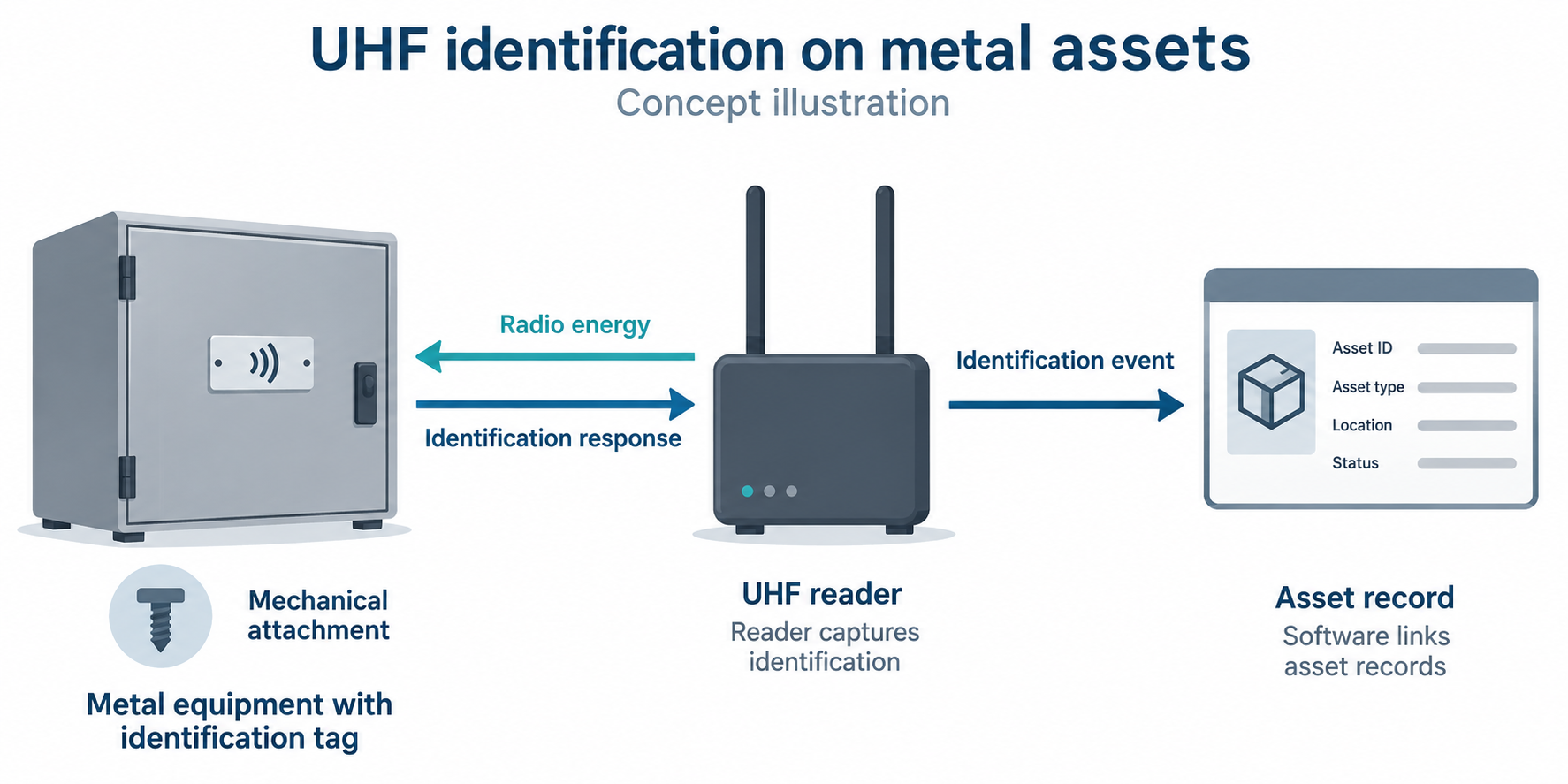
Metal changes an RFID antenna’s electrical behavior and the radio field around it. A conventional label that works on packaging can lose much of its reading range when placed directly on a metal enclosure. Purpose-designed on-metal tags account for the mounting surface through their antenna and supporting structure. Different constructions achieve this in different ways.
The original listing describes DO-K10523 as a passive UHF RFID tag for metal assets. A compatible reader supplies radio energy, and the tag returns identification data by modulating the reflected signal. The tag needs no battery for this exchange.
Mechanical fastening holds the tag in position; on-metal antenna design enables communication on the intended surface. Choose a position that provides both a sound fixing surface and a usable radio path. A firmly attached tag can still read poorly when surrounding metal shields it or its orientation is unfavorable.
Mounting geometry: two 6 mm holes
DO-K10523 measures 69 × 23 mm and has two holes, each 6 mm in diameter, for screw mounting. Allow room around this footprint for fastener heads, installation tools and normal equipment servicing.
A 6 mm hole diameter alone does not guarantee clearance for an M6 screw or establish that the hole is threaded. M6 specifies a nominal metric thread size; fit also depends on clearance and tolerances. Select the screw assembly using the hole geometry, fastener-head contact area and mounting surface together.
Before preparing a mounting pattern, request a dimensional drawing or check a physical sample for hole spacing and tag thickness. Confirm the fastener size and tightening guidance before installation so the assembly clamps the tag without damaging its housing. On a chassis, keep ventilation openings, removable covers and service access clear.
Screw mounting can suit assets that undergo repeated handling, provided suitable fixing points are available. Where vibration or impact is expected, evaluate retention with the intended fasteners and mounting surface under representative conditions. The two-hole design alone does not establish vibration resistance, permanent attachment or tamper evidence.
The model configuration includes 3M 300LSE adhesive. If you plan to use adhesive with screws, confirm the intended assembly method and surface preparation before installation; the adhesive designation does not determine fastener selection or tightening torque.
DO-K10523: the listed configuration
The DO-K10523 product listing specifies the following electronic configuration and housing. Use these details to match the tag to your reader and data requirements; the mounting dimensions are 69 × 23 mm with two 6 mm diameter holes.
| Parameter | Configuration or value | What it means for evaluation |
|---|---|---|
| Model | DO-K10523 | Use this model identifier when requesting drawings or discussing an application |
| Footprint and holes | 69 × 23 mm; two holes, each 6 mm diameter | Check available space and fastener fit; hole diameter does not guarantee M6 clearance |
| Protocol | EPC Class 1 Gen2; ISO 18000-6C | Match the reader’s supported protocol |
| Frequency | 860–960 MHz | Evaluate within the reader’s regional operating band |
| Chip | NXP UCODE 8 | The chip configuration listed for DO-K10523 |
| Memory | EPC 128 bits; user memory 0 bits; TID 96 bits | Use the EPC identifier to associate the asset with software records |
| Operation | Read/write | Writing depends on the memory bank and its access settings |
| Material and color | ABS, white | Assess housing fit and exposure for the intended asset |
| Adhesive | 3M 300LSE | Confirm assembly method if combining adhesive and screws |
| Polarization | Linear | Alignment with the reader antenna affects communication |
The 860–960 MHz band does not mean a reader may operate across that entire range in every country. Use the appropriate regional reader configuration and assess the tag within that band.
ABS is the housing material specified for DO-K10523. Ceramic and PCB constructions are alternatives to compare across the on-metal tag category, rather than configurations offered here for this model.
What zero user memory means for asset records
In this listed configuration, the 128-bit EPC memory holds an identifier that software can associate with an asset’s serial number, assigned location, maintenance history or inspection record. Keeping those records in a database lets the information change without storing the full record on the tag.
Zero user memory means there is no separate user-memory bank for an additional maintenance log on the tag. TID is a different memory area for chip identification; it is not freely writable asset-record storage. If your workflow requires data to remain directly on the tag for use without database access, compare tags with suitable writable memory.
For example, a technician can read a chassis identifier and open its maintenance record in connected software. Recording service work updates that software record. The tag itself does not schedule maintenance or provide the application.
Interpreting the listed reading distances
The DO-K10523 product listing gives separate reading distances for two reader contexts. Use the row relevant to your reader arrangement as a starting point for evaluation:
| Reader context in the product listing | Listed reading distance |
|---|---|
| JT-972 handheld reader, on a metal surface | 0–10 m |
| JT-8290 fixed RFID reader | 0–15 m |
These are separate reader-specific figures, not a guaranteed 10–15 m installation range. The handheld figure applies to a metal mounting surface. Before using the fixed-reader figure to plan a checkpoint, confirm the mounting arrangement, antenna and power settings behind it and compare them with your installation.
Actual results depend on reader power, antenna characteristics, operating band, tag orientation, mounting surface and surrounding objects. With the tag’s linear polarization, antenna alignment is particularly relevant. A circularly polarized reader antenna can help accommodate changing orientations, but it does not eliminate shielding or losses from an unfavorable mounting position.
An exposed tag on a container wall and a tag recessed behind a metal chassis lip face different radio conditions. UHF identification does not require optical line of sight, but reading through a closed metal enclosure should not be assumed. Compare accessible mounting positions before fixing the tag in place.
For a handheld audit, test at the operator’s normal scanning positions. For a fixed checkpoint, test the expected asset orientations, movement and neighboring objects. Record missed reads and unintended reads from adjacent assets, then adjust placement and reader settings to define the intended reading zone. Repeatable identification within that zone matters more than the longest isolated read.
If identifiers must be written after installation, test writing separately. A successful read at a given distance does not prove that a write will succeed there.
Operating limits and environmental exposure
Use the operating range for in-service identification and the storage range for storage conditions. The product listing also reports a separate thermal cycling test:
| Parameter | Value in the product listing |
|---|---|
| Operating temperature | −25°C to +85°C |
| Storage temperature | −30°C to +110°C |
| High and low temperature alternating test | Reported as passed: −40°C to +150°C, seven alternating cycles over two consecutive days |
| Ingress protection | IP68 |
The reported cycling test does not extend the operating range to +150°C, and the storage range is not a reading or writing range. If your process includes temperature cycling, request the test method, dwell times and acceptance criteria to compare the reported exposure with your own heating and cooling cycle.
For immersion, confirm the depth and duration associated with the IP68 rating. For washdown, assess water pressure, temperature and cleaning chemicals separately. Water ingress, chemical resistance, impact, abrasion and attachment retention are different properties, so select and test against the exposures the installed tag will actually encounter.
For equipment that is cleaned, heated or repeatedly handled, evaluate the complete assembly, including housing, adhesive if used, fasteners and mounting surface. Check both identification performance and physical retention after representative exposure.
Applying the tag to tools, IT chassis and containers
Tools, IT chassis and metal containers present different placement and reading tasks. Use the asset’s handling pattern to decide where the tag belongs and how its identifier will be captured.
| Asset | How identification can help | What to evaluate |
|---|---|---|
| Tools and equipment | Associate an identifier with an issue, return or inspection record | Footprint, handling clearance, impact exposure and reading position |
| IT chassis | Associate equipment with inventory and service records | Nearby rack metal, ventilation, access and removable panels |
| Metal containers | Record identification at a handheld scan or fixed reading point | Orientation, stacking, shielding and reads from adjacent containers |
For a chassis audit, an operator might scan along a rack aisle and compare the collected identifiers with the expected equipment list. Missed tags need follow-up, while reads from adjacent racks may need filtering. The reader collects identification events; software associates them with asset records and applies the audit rules.
A fixed reader detecting a container produces an identification event at that reading point. It does not establish the container’s position between reading points. Choose checkpoint identification when records of passage meet the task; continuous location reporting requires additional system design. The passive tag alone does not prevent asset loss.
Comparing mounting methods and tag constructions
When choosing a screw mounted RFID tag for metal assets, compare mounting method separately from material. A PCB or ceramic-based tag may also have mechanical fixing features. Material names do not establish a universal ranking of strength, range or cost.
Choose mechanical attachment when suitable fixing points and assembly access are available and retention through handling is a priority. Adhesive attachment avoids drilling but depends on surface preparation, the adhesive system and exposure. If modifying the asset is unsuitable, compare an adhesive format designed for the surface and validate its retention under the expected conditions.
Compare finished tags by footprint, fixing features, environmental limits and reading performance under comparable conditions. For DO-K10523, include its 69 × 23 mm footprint, two-hole mounting and listed UCODE 8 memory configuration in that comparison. A smaller format may resolve a space constraint, while a tag with user memory may better suit a workflow that stores data directly on the asset.
Browse anti-metal RFID tags for alternative formats. The anti-metal RFID tag selection guide explains broader construction and configuration choices. For this UHF on-metal asset tag, evaluate the two-hole geometry and listed configuration using the intended asset, reader and working conditions.
Frequently asked questions
Does a 6 mm mounting hole guarantee that an M6 screw will fit?
No. DO-K10523 has two holes, each 6 mm in diameter, but that diameter does not establish M6 clearance, tolerances or threading. Check a dimensional drawing or sample and confirm the intended fastener assembly before installation.
Can a phone’s NFC function read this UHF tag?
A phone’s built-in NFC function cannot read this UHF tag. Reading requires a compatible UHF RFID reader, such as a handheld unit, fixed reader or suitable external phone accessory.
Can DO-K10523 store a maintenance log?
The listed UCODE 8 configuration has 128-bit EPC memory, zero user memory and 96-bit TID. Its identifier can link to maintenance records in software, but there is no separate user-memory bank for a maintenance log.
To evaluate DO-K10523 for your project, send an inquiry with the asset material and available mounting space, reader model and operating region, required reading position or distance, and expected temperature or cleaning exposure. Request the mounting drawing and relevant exposure details, then test a sample on the intended asset before committing to the installation.

Do RFID is a leading China-based manufacturer with over 15 years of experience. We specialize in customized RFID readers, tags, and cards, delivering high-quality, tailored solutions that meet your unique business needs and drive seamless, efficient identification.