October 21, 2026
For reliable RFID windshield tag installation, choose a location permitted by the tag instructions and vehicle guidance, test it with the actual lane reader, then bond the tag to clean, dry glass. Repeat the test after installation. Windshield coatings, nearby metal and tag orientation can all affect reading performance.
A position near the rearview mirror is a common candidate, but the right location must provide repeatable reads during normal approaches while keeping the driver’s view and vehicle sensors clear. Test before permanently attaching a label that may be damaged by removal.
Choose a windshield location with a usable radio path
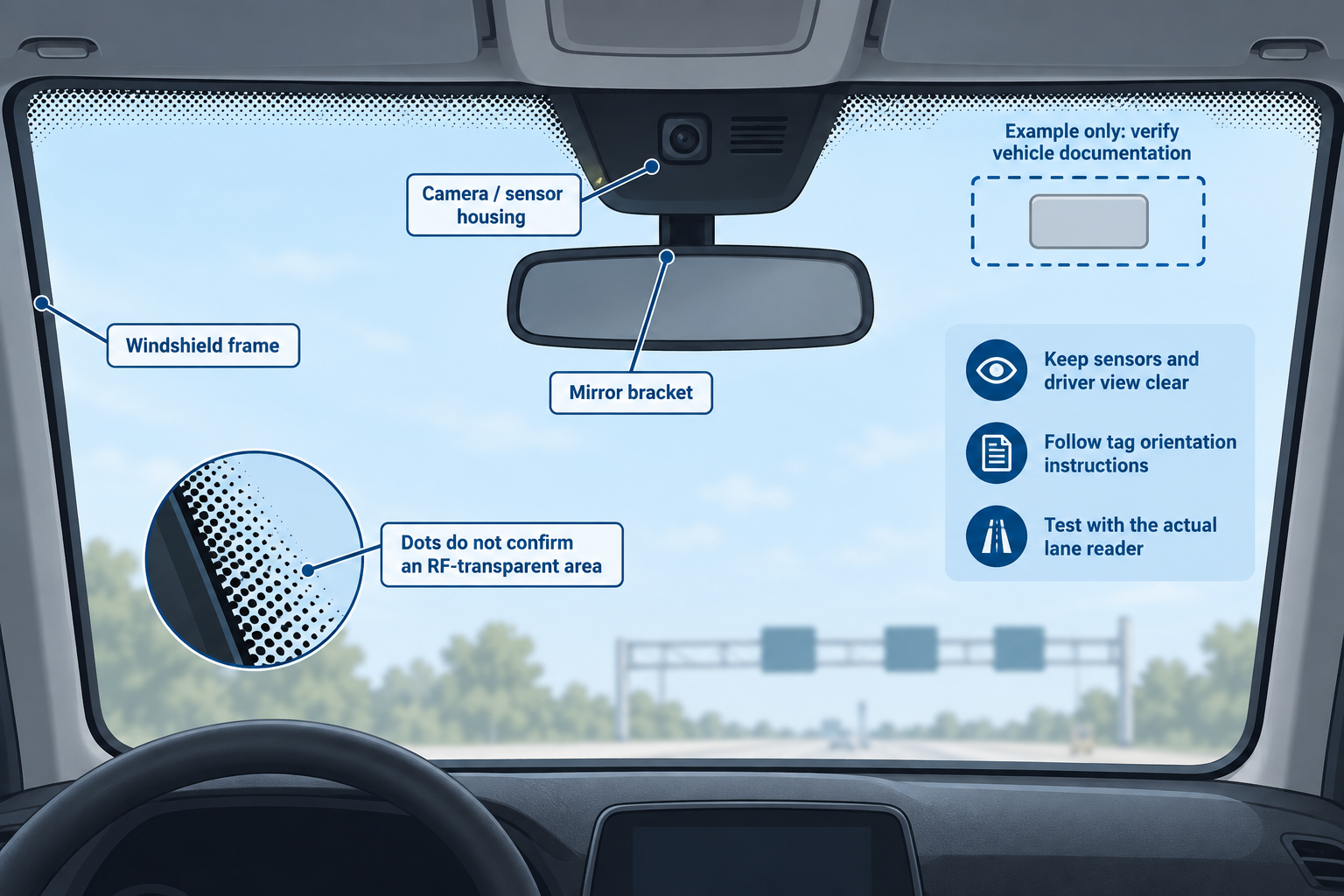
A passive UHF tag receives power from the reader’s radio signal and responds by modulating the reflected signal, a process called backscatter. Both directions of communication must work. A conductive windshield coating can weaken both the signal powering the tag and the response reaching the reader.
Ordinary uncoated glass often permits useful UHF communication. Conductive coatings, some window films and nearby metal can reduce performance. Glass also changes the electrical environment around the tag antenna, which is why testing against the actual windshield matters.
Check the glass construction
Look in the vehicle documentation for a designated transponder area or RF-transparent window: a section intended to let radio signals pass through a coated windshield. Its location and size depend on the vehicle and glass version. Replacement glass may differ from the original.
The black dotted pattern around a mirror or windshield edge does not prove that the underlying glass is free of a conductive coating. Tint darkness is also an unreliable guide. Relatively clear heat-reflective glass can cause problems, while some darker nonmetallic films may allow reads.
Where a designated area exists, make sure the complete tag fits within it. Keep the tag clear of camera housings, rain sensors, mirror brackets and other equipment, following the vehicle’s placement restrictions.
Allow for nearby metal and tag orientation
Avoid placing the tag against the metal windshield frame, mirror brackets or heating conductors. Keep it separated from other transponders according to the relevant installation instructions. Nearby conductive objects can change antenna tuning or obstruct the radio path; there is no universal clearance suitable for every tag.
Follow the tag’s orientation markings. With a linearly polarized reader antenna, rotating a typical dipole tag can significantly change the energy it receives. Circular polarization reduces sensitivity to rotation but does not eliminate shielding, windshield-angle or coverage problems.
Mount inside the windshield only when the tag is designed for that position. Follow the designated adhesive side and mounting direction; printed graphics alone may not identify the correct orientation.
RFID windshield tag installation step by step
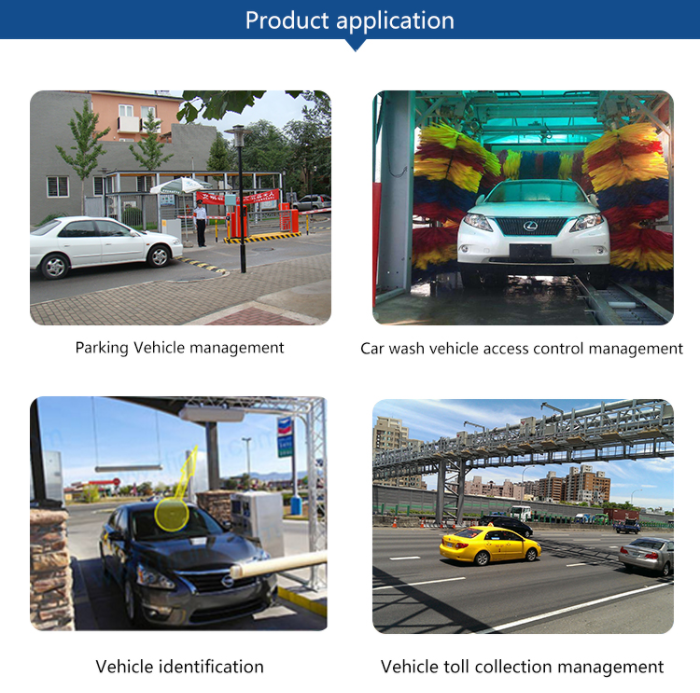
Have the tag instructions, a suitable cleaner, a lint-free cloth and access to the reader’s diagnostic read log. Keep spare tags outside the test area so their identifiers cannot be mistaken for the installed tag.
1. Confirm the tag identifier and vehicle record
Use a compatible UHF reader to read the identifier used by the access system, often the EPC. Match it to the correct vehicle record and check the required permissions. If the tag requires a glass mounting surface for this check, follow its test instructions.
Radio compatibility and access permission are separate. A reader can detect a tag while the application rejects its identifier. An 860–960 MHz label still requires compatibility with the reader’s protocol and actual operating band; it does not establish acceptance by a particular parking or toll system.
For gate-system context, see the RFID parking access system overview.
2. Test the proposed location before bonding
With the vehicle stationary in a controlled test lane, place the tag at the candidate location using the supplier’s approved temporary test method. Keep its orientation and contact with the glass as close to the final installation as practical. Keep hands away from the antenna during the reading check.
Temporary placement is a screening test. A release liner, tape or air gap can change performance, and some tags work best only after mounting on glass. A loose tag’s result cannot establish final installed performance.
Compare permitted locations one at a time while keeping vehicle position and reader settings unchanged. Record which location produces consistent reads. Do not repeatedly stick and peel a permanent or tamper-evident label to search for a better position.
3. Clean and dry the mounting surface
Remove dust, grease and cleaning residue using a cleaner compatible with the mounting surface and the tag instructions. If window film is present, follow its cleaning restrictions and confirm that mounting on the film is permitted. Let the surface dry completely.
Apply the tag within its specified application-temperature range. This differs from operating temperature: an adhesive that survives service temperatures may bond poorly when applied to very cold or hot glass. Follow any specified bonding time before exposing the installation to handling or other stress.
4. Apply without damaging the antenna
Handle the label by its edges and avoid touching the adhesive. Remove the release liner as directed, align the tag and apply it smoothly with the recommended pressure. Keep it flat against the mounting surface without folds or lifted edges.
Do not trim, puncture or sharply crease the label. The antenna may extend into apparently unused margins. Avoid hard scraping over the chip or antenna when smoothing the tag.
Some windshield tags contain structures intended to break during removal. If placement is wrong after bonding, follow the tag’s replacement procedure rather than assuming it can be transferred intact.
5. Retest the finished installation
After any specified adhesive settling period, test the permanently mounted tag with the windows closed and the vehicle in its normal operating condition. Confirm the correct identifier in the reader log, the application’s access decision and the resulting gate action.
Final acceptance depends on the bonded tag working through the actual windshield during normal lane approaches.
Test repeatable lane reads
Identify the point by which the system must recognize an approaching vehicle. At a gated entrance, the read must occur early enough for processing and barrier operation at the site’s permitted approach speed.
Run repeated approaches through the intended read zone, including normal variations in lane alignment, stopping position and permitted speed. Follow the site’s traffic procedures and stop as required; do not approach a closed barrier assuming it will open.
Record:
- Vehicle model and known windshield or film details.
- Tag model, identifier, mounting location and orientation.
- For tag model choices, see UHF windshield car sticker options.
- Lane and reader antenna used.
- Approach direction, approximate speed and first successful read position.
- Approaches with a timely, correct read divided by total approaches.
- Whether the correct access action followed each read.
Ten reads while a car remains stationary test one position. Ten separate approaches provide more useful installation evidence, although a short trial alone does not establish long-term reliability. Set acceptance criteria around timely identification on each required approach, not the number of duplicate reads generated during one pass.
For fleet deployments, test representative windshield types and vehicle heights. A location that works on one car may fall outside effective antenna coverage on another. Check for unintended reads from waiting vehicles or adjacent lanes as well.
Reader signal-strength values can help compare placements under unchanged conditions. They are supporting evidence; repeatable identification at the required point is the acceptance measure. A single maximum-distance read does not establish reliable lane operation.
UHF windshield tag troubleshooting
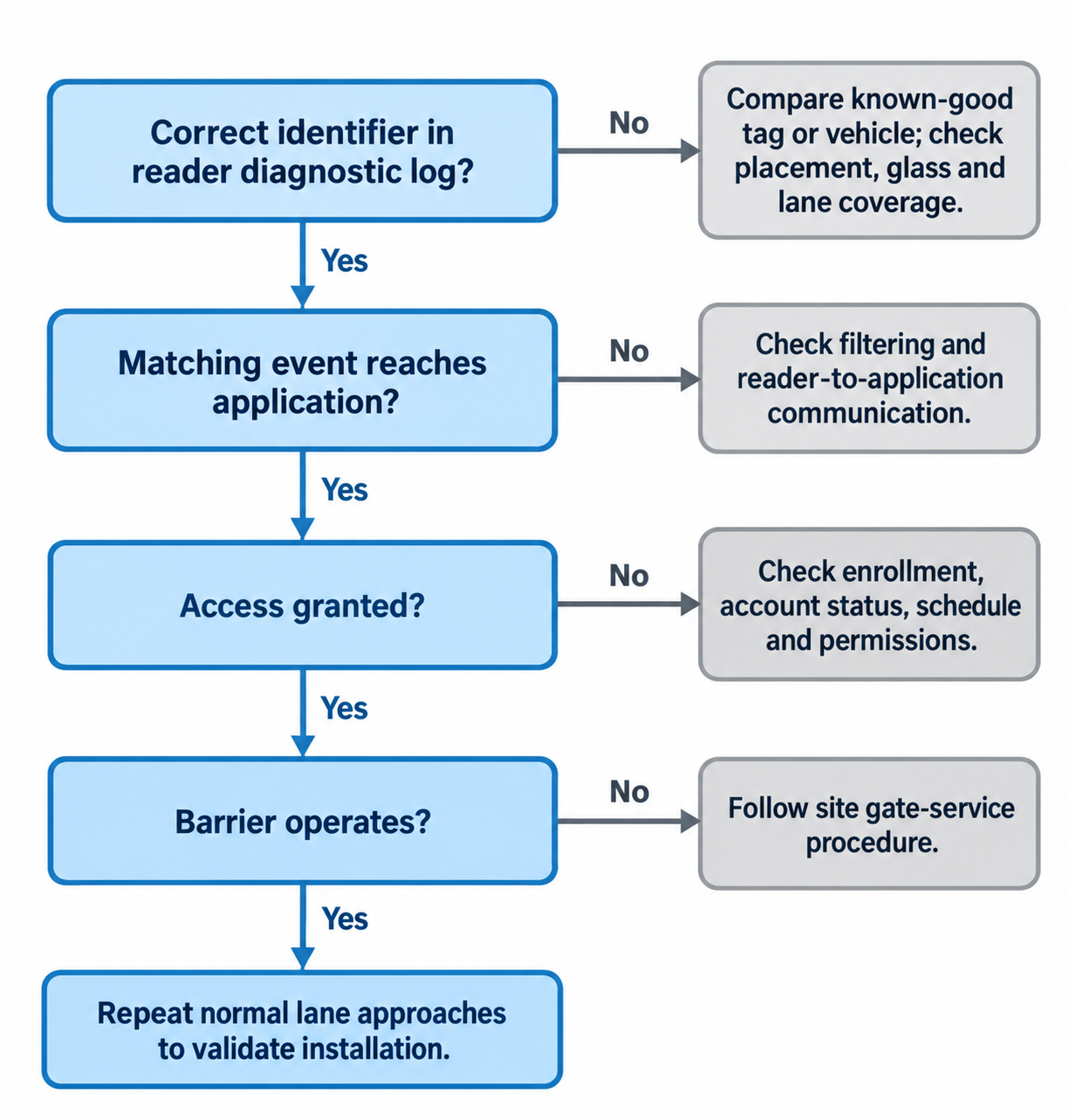
Start by checking whether the correct identifier appears in the reader’s diagnostic log at the time of the failed approach. A missing event in the access application’s log alone does not prove that the radio read failed: filtering or communication between the reader and application may also suppress the event.
Use a known-good compatible tag or vehicle as a control, and change one variable at a time.
| Symptom | Possible explanation | Useful next check |
|---|---|---|
| Correct identifier is logged and access is explicitly denied | Enrollment, account status, schedule or access rule | Check the vehicle record and access-decision log before moving the tag |
| Correct identifier is logged, but no access decision appears | Filtering or communication between reader and application | Trace the timestamped read into the application with the system operator |
| Access is granted in the log, but the barrier stays closed | Downstream control or barrier condition | Follow the site’s gate-service procedure |
| Tag reads in an unobstructed test but poorly through the windshield | Glass or film attenuation, mounting effects or unsuitable placement | Compare permitted glass locations with unchanged reader settings and orientation |
| Reads improve substantially when an unbonded test tag is rotated | Polarization mismatch or orientation-sensitive coverage | Verify the specified orientation and repeat the placement test |
| Reads occur only when the vehicle stops very close | Weak radio link or coverage reaching the tag too late | Compare permitted placements and vehicle positions within the required read zone |
| One tag fails while a known-good equivalent works under matched conditions | Tag damage or a tag-specific problem | Inspect for creases, peeling or antenna damage and repeat the comparison |
| Several previously working vehicles fail in one lane | Shared reader, coverage or environmental change | Test a known-good vehicle and review recent lane changes |
| Tag stops working after removal or repositioning | Antenna or tamper structure may have broken | Replace according to the tag instructions and update the vehicle record |
Isolate an RFID tag not reading through the windshield
Use a known-good compatible tag of the same type where possible. Compare it with the suspect tag under equivalent mounting conditions. A glass-tuned tag held loose in a hand is a poor control for a bonded windshield tag.
For an unbonded test tag, compare an unobstructed radio path with the path through the windshield while keeping distance, orientation and support conditions as similar as practical. A substantial drop through the glass makes attenuation a stronger explanation. Changing position also changes coverage and reflections, so one comparison is a clue rather than conclusive proof. Do not peel off an installed tag to conduct this test.
Next, test the vehicle’s documented transponder area. If it works while other positions fail, use it only if the complete tag fits and mounting is permitted. If no permitted interior location works, the system provider may need to specify an alternative mounting arrangement. An interior adhesive label should not be moved outdoors unless designed for that use.
Separate tag faults from lane faults
If a known-good vehicle also fails, investigate shared lane conditions before replacing individual tags. A moved antenna, new metal structure or changed reader configuration can affect multiple vehicles. Have the operator check whether the reader is inventorying tags and whether filters exclude the expected identifier.
Increasing reader power is not a reliable cure for every failed read. It may widen detection into adjacent lanes without resolving shielding or antenna damage. Any adjustment must remain within the approved configuration and applicable limits, followed by repeat lane testing.
For example, if a replacement tag works under matched conditions while the original fails, investigate the original tag. If both fail through the same windshield but work under comparable unobstructed conditions, investigate the glass and placement. If several known-good vehicles fail only in one lane, investigate that lane.
Keep the installation reliable after handover
Record the accepted mounting position and test results so future installers can repeat the method. Retest after windshield replacement, new window film, tag replacement or changes to lane antenna placement. When replacing a tag, update its vehicle association and retire the old credential according to the site’s procedure.
For an unresolved issue, provide support with the vehicle and glass details, tag model and identifier, a placement photo, reader and antenna models, and controlled test results. Include timestamped examples showing whether the failure was a missing reader detection, a missing application event, an explicit denial or a granted access event without gate movement. These observations identify the next useful check.
Frequently asked questions
Where is the best place to install an RFID windshield tag?
Use a location permitted by the tag instructions and vehicle documentation, then verify it with the actual lane reader. Near the rearview mirror is a common candidate. Coated windshields may require a designated transponder area; the dotted glass pattern alone does not identify one.
Can window tint stop a UHF windshield tag from reading?
Yes. Conductive metallic films and some heat-reflective windshield coatings can weaken UHF communication. Tint darkness alone does not predict performance. Check the glass or film construction and test permitted mounting locations.
Can I peel off a windshield RFID tag and reuse it?
Removal can damage the antenna or adhesive, and some tags deliberately include breakable tamper structures. Reuse depends on the tag’s construction and instructions. If replacement is required, update the vehicle record and retire the old credential according to the site’s procedure.
Can I test a UHF windshield tag with my phone?
A phone’s built-in NFC function cannot read a passive UHF windshield tag because it uses a different radio technology. Use a compatible UHF reader or a suitable external UHF accessory.
Why does the reader detect my tag but the gate stay closed?
A radio read is only one step. Check whether the application receives the identifier, grants access and sends the expected control action. Enrollment, permissions, application communication or a downstream barrier condition may explain the failure.