July 16, 2026
Near Field Communication (NFC) stickers, also known as NFC tags, are small, programmable chips that can store and transmit data when tapped by an NFC-enabled smartphone or reader. Despite their simplicity, they offer a powerful way to automate tasks, share information, and enhance user experiences across personal, commercial, and industrial settings. This guide provides a comprehensive overview of how to use NFC stickers effectively, supported by current market data, technical specifications, and practical best practices.
Understanding NFC Stickers: What They Are and How They Work
NFC stickers consist of a microchip and an antenna embedded in a thin, adhesive label. They operate on the 13.56 MHz radio frequency and require no internal power source—instead, they draw energy from the electromagnetic field generated by an NFC reader (like your smartphone). When you bring your phone close to the sticker (typically within 1–10 cm), the phone powers the tag and reads or writes data using the NFC Data Exchange Format (NDEF), a standardized protocol for exchanging information.
Unlike QR codes, which require a camera and an app to scan, NFC interactions are faster, more secure, and work even in low-light conditions. Moreover, NFC supports bidirectional communication in advanced setups, though most consumer-grade stickers are read-only or rewritable but not actively transmitting.
As of 2025, NFC technology has seen widespread adoption. The global secure NFC market was valued at $64.2 billion (RMB 46.2 billion) in 2024 and is projected to grow at a compound annual growth rate (CAGR) of 12.49%, reaching $130.3 billion (RMB 93.6 billion) by 2030. Key application sectors include retail, transportation, healthcare, industrial automation, and financial services.
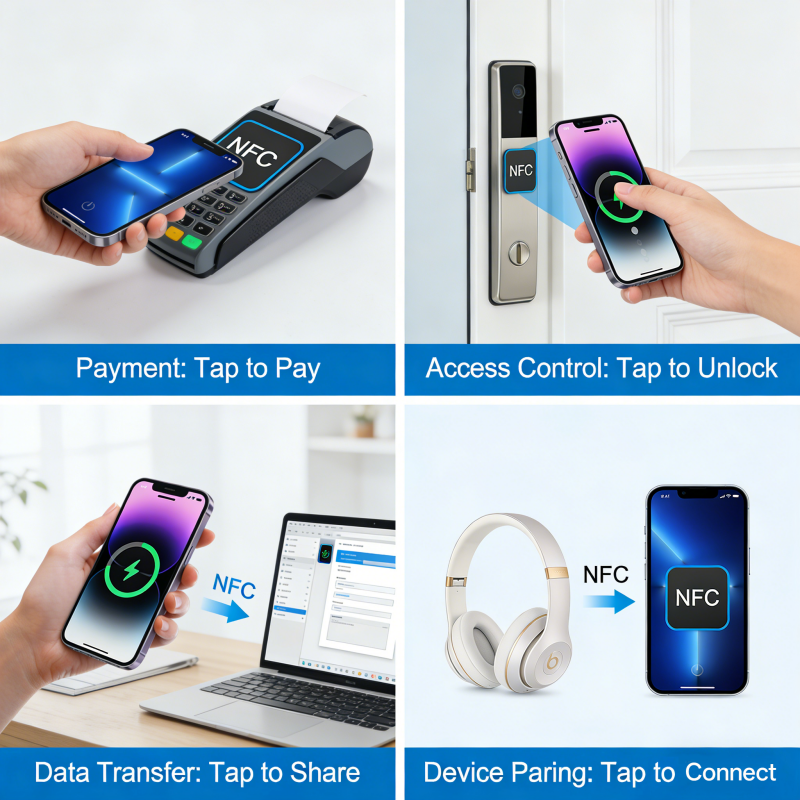
NFC stickers have many use cases in daily life.
Step-by-Step: How to Program and Use an NFC Sticker
1. Check Device Compatibility
Most modern smartphones support NFC:
- Android: Nearly all devices released since 2018 have full read/write capabilities.
- iOS: Starting with the iPhone 7 (with limitations), and significantly improved from iPhone XS/XR onward. Full background tag reading is supported from iOS 13+, and writing is possible via apps like NFC Tools (available on the App Store).
Note: While iPhones can read most NDEF-formatted tags out of the box, writing often requires third-party apps. Android offers more native flexibility.
2. Choose the Right NFC Sticker
Not all NFC tags are created equal. The choice depends on your use case:
| Tag Type | Memory Capacity | Typical Use Case | Write Endurance | Key Features |
|---|---|---|---|---|
| NTAG213 | 144 bytes | URLs, short text, Wi-Fi credentials | 100,000 cycles | Cost-effective, widely compatible |
| NTAG215 | 504 bytes | vCards, longer messages, app links | 100,000 cycles | Balanced capacity and price |
| NTAG216 | 888 bytes | Complex automation scripts | 100,000 cycles | Highest capacity in NTAG series |
| MIFARE Ultralight | 48–192 bytes | Event tickets, loyalty cards | 10,000–100,000 cycles | Common in transit systems |
| MIFARE Classic | 1K/4K bytes | Access control (legacy systems) | ~100,000 cycles | Requires authentication; less secure |
For general-purpose use (e.g., launching a website or toggling phone settings), NTAG213 is ideal due to its reliability and affordability (~$0.10–$0.30 per tag in bulk).
3. Install an NFC Programming App
Popular, user-friendly apps include:
- Android: NFC Tools, Trigger, MIFARE Classic Tool (for advanced users)
- iOS: NFC Tools, NFC Writer by NXP
These apps allow you to encode various types of data:
- URLs (e.g., open a restaurant menu)
- Text (e.g., leave a note on a fridge)
- Wi-Fi credentials (tap to connect guests)
- Phone actions (toggle Bluetooth, set volume, launch apps)
- vCards (share contact info)
4. Encode the Sticker
- Open your chosen app.
- Select “Write” or “Add Record.”
- Choose the data type (e.g., URL).
- Enter the content (e.g.,
https://yourwebsite.com). - Tap “Write” and hold your phone against the blank NFC sticker until confirmation appears.
Tip: Always test the tag after writing. Some phones require you to disable “NFC payments” temporarily to avoid interference.
5. Lock the Tag (Optional but Recommended)
To prevent accidental overwrites, most apps offer a “Lock” or “Make Read-Only” option. Once locked, the tag cannot be modified—ideal for public installations or permanent setups.
Practical Applications Across Industries
Smart Homes & Personal Automation
- Morning Routine: Place a sticker by your bed to trigger “Good Morning” mode—turn on lights, read weather, and play news.
- Guest Mode: Stick an NFC tag near your front door to share Wi-Fi without revealing the password.
Retail & Marketing
Brands use NFC stickers in product packaging for:
- Authenticity verification
- Interactive storytelling (e.g., video about product origin)
- Loyalty program enrollment
A 2025 case study from Hong Kong demonstrated how NFC charity stickers turned donors into instant volunteers: each sticker allowed passersby to donate via tap, increasing fundraising efficiency beyond traditional 5-hour weekend sales windows.
Workplace & Industrial Use
- Asset Tracking: Encode equipment IDs for quick inventory scans.
- Access Logs: Replace manual sign-in sheets with NFC check-in stations.
- Maintenance Alerts: Technicians tap a machine’s tag to view service history.
Healthcare
Hospitals embed NFC tags in patient wristbands to:
- Pull up medical records instantly
- Reduce medication errors
- Track staff movements for infection control
Choosing the Right NFC Sticker Form Factor for Your Use Case
Not all NFC stickers are created equal—beyond the chip type (e.g., NTAG213), the physical form factor and material significantly impact performance, durability, and suitability for specific environments. Selecting the right format ensures reliable operation and longevity. Below is a detailed breakdown of common NFC sticker types available in 2025:
| Form Factor | Material & Construction | Key Features | Best-Use Environments | Limitations |
|---|---|---|---|---|
| Standard Paper/PET Sticker | Thin PET or paper substrate with adhesive backing | Ultra-thin (0.2–0.4 mm), printable, low-cost (~$0.08–$0.20/unit in bulk) | Indoor use: posters, business cards, product packaging, notebooks | Not waterproof; easily damaged; poor performance near metal or liquid |
| Epoxy (Round/Rectangular) | NFC chip encased in clear epoxy resin dome | Durable, water-resistant, scratch-proof, aesthetically pleasing | Outdoor kiosks, retail displays, keychains, promotional giveaways | Slightly thicker (2–4 mm); not flexible; higher cost (~$0.30–$0.80) |
| Anti-Metal (On-Metal) Tag | Includes a ferrite or EMI shielding layer between chip and metal surface | Functions reliably when attached directly to metal surfaces (e.g., machinery, vehicles) | Industrial equipment, server racks, automotive dashboards, metal doors | Larger size; 20–30% more expensive than standard tags; reduced read range on non-metal surfaces |
| Waterproof/Washable Label | Encapsulated in PVC or laminated PET with IP67/IP68 rating | Resistant to moisture, chemicals, and repeated washing | Laundry tags (hospital uniforms), outdoor asset tracking, marine environments | Requires industrial-grade adhesive; may need special printer for custom labeling |
| Flexible Silicone or Rubber Tag | Soft, bendable casing with embedded NFC chip | Impact-resistant, operable in extreme temperatures (-25°C to +85°C) | Wearables, sports gear, pet collars, ruggedized tools | Limited customization; higher unit cost |
| Key Fob or Card Format | Rigid PVC or ABS plastic in card (85.6 × 54 mm) or fob shape | Compatible with access control systems; easy to carry | Employee ID badges, gym memberships, hotel room keys | Less discreet; requires lanyard or wallet |
Critical Considerations:
- Metal Interference: Standard NFC tags fail when placed on metal due to eddy currents. Always use anti-metal variants for such applications.
- Environmental Exposure: For outdoor or high-moisture settings, prioritize IP-rated or epoxy-encapsulated tags.
- Read Range: Thicker materials (e.g., epoxy) may slightly reduce read distance compared to thin stickers—but improve reliability.
- Custom Branding: Many suppliers offer full-color printing, QR code + NFC hybrid labels, or custom shapes for marketing campaigns.
By matching the form factor to your operational environment, you avoid common pitfalls like tag failure, inconsistent reads, or premature wear—ensuring your NFC automation works seamlessly over time.
Step-by-Step Tutorials: 5 Real-World NFC Automation Projects
Here are five practical, beginner-friendly NFC automation projects you can implement today using free apps like NFC Tools (iOS/Android). Each includes required materials, setup steps, and real-world benefits.
1. Smart Home “Good Morning” Routine
Goal: Tap your nightstand to trigger morning actions.
Materials: NTAG213 sticker, smartphone with NFC.
Steps:
- Open NFC Tools → “Write” → Add Records.
- Add:
- Wi-Fi: Connect to home network
- Tasker/AutoTools Action (Android): Launch weather app + news briefing
- Volume: Set media volume to 30%
- Bluetooth: Turn off (to save battery)
- Write to tag and stick it beside your bed.
Result: One tap silences alarms, shares daily forecast, and preps your phone for the day.
2. Guest Wi-Fi Access Without Password Sharing
Goal: Let visitors connect to Wi-Fi instantly.
Materials: Waterproof NFC sticker, router credentials.
Steps:
- In NFC Tools, select “Add Record” → “Wi-Fi Network.”
- Enter SSID, password, and security type (WPA2/WPA3).
- Write to a durable epoxy tag and place near your front door or guest room.
- Guests tap their phone → auto-connects without seeing the password.
Privacy Note: iOS requires user confirmation; Android connects silently if permitted.
3. Pet Emergency Tag with Owner Contact & Medical Info
Goal: Embed vital info on your pet’s collar.
Materials: Silicone NFC tag (waterproof, chew-resistant), vet records.
Steps:
- Encode a vCard with your name, phone, address, and emergency contact.
- Add a URL linking to a Google Doc with vaccination history, allergies, and vet instructions.
- Securely attach the tag to the collar.
Benefit: If your pet is lost, any passerby with an NFC phone can access critical info—no app needed for URL/vCard reading.
Regarding NFC stickers for pets or waterproof applications, you can check out this content: Custom Waterproof PVC PET RFID on metal NFC Tag
4. Car “Driving Mode” Automation
Goal: Automatically enable safe driving settings.
Materials: Anti-metal NFC tag, car dashboard.
Steps:
- Program the tag to:
- Launch navigation app (e.g., Google Maps)
- Enable “Do Not Disturb” mode
- Set Bluetooth to car audio profile
- Dim screen brightness
- Affix the anti-metal tag to the dashboard (metal-safe).
Safety Tip: Test thoroughly—ensure no distracting pop-ups occur while driving.
Regarding anti-metal NFC stickers, you can check out this content: Anti metal Epoxy RFID NFC sticker for phone
5. Library Book Checkout/Return Reminder
Goal: Simplify personal book tracking.
Materials: Paper NFC sticker, notebook or book cover.
Steps:
- Create a text record: “Borrowed from City Library – Due: [Date].”
- Optionally add a URL to your library account login.
- Stick inside the book cover.
Bonus: Use Google Sheets + IFTTT to log checkouts automatically when tapped (advanced).
These projects demonstrate NFC’s versatility—from convenience to safety—using affordable hardware and intuitive software. Start small, then expand to multi-tag ecosystems as you gain confidence.
Troubleshooting Common NFC Sticker Issues
Even with proper setup, users often encounter issues when deploying NFC stickers. Below are the most frequent problems, their root causes, and step-by-step solutions—validated across iOS (iPhone XS and newer) and Android (8.0+) devices as of 2025.
1. Phone Doesn’t Recognize the Tag
Symptoms: No vibration, sound, or pop-up when tapping.
Possible Causes & Fixes:
- NFC Disabled:
- Android: Go to Settings > Connected Devices > NFC → toggle on.
- iOS: NFC is always on for reading NDEF tags—but ensure no wallet/payment app is monopolizing the NFC antenna (try restarting the phone).
- Poor Alignment: The phone’s NFC antenna is usually near the top-center (iPhone) or center-back (Samsung). Hold the phone flat against the tag for 1–2 seconds.
- Tag Damaged: Test with another phone. If still unresponsive, the chip may be cracked or shorted (common in bent paper tags).
2. “Tag Not Writable” or “Memory Full” Error
Symptoms: App fails to write data; error message appears.
Causes:
- Insufficient Memory: NTAG213 (144 bytes) can’t store long URLs + text + actions. Check payload size in your app before writing.
- Tag Already Locked: Once locked (intentionally or accidentally), tags become read-only. Use a fresh tag.
- Write Protection: Some industrial tags have password protection (e.g., MIFARE Classic). You’ll need authentication keys—avoid these for general use.
Tip: In NFC Tools, use “Analyze” to check available memory and lock status before writing.
3. Inconsistent Read Range or Intermittent Reads
Symptoms: Works sometimes, fails other times—even with same phone/tag.
Root Causes:
- Metal or Liquid Interference: Water, human hands, or metal surfaces absorb NFC signals.
- Fix: Use anti-metal tags for metallic surfaces; avoid placing tags on bottles or near wrists during testing.
- Low-Quality Antenna: Cheap tags may have poorly tuned antennas. Stick to reputable brands (e.g., NXP NTAG series).
- Phone Case Thickness: Cases >3 mm (especially with metal plates for MagSafe) can block signals. Remove case during initial testing.
4. iOS vs. Android Behavior Differences
| Issue | iOS (16–18) | Android (10–14) |
|---|---|---|
| Background Reading | Only reads NDEF-formatted tags automatically; no custom actions without app | Can trigger Tasker/Automation apps in background |
| Writing Capability | Requires third-party app (e.g., NFC Tools); limited to NDEF records | Native write support in many launchers; full NDEF control |
| Wi-Fi/Bluetooth Toggles | Cannot directly toggle system settings via NFC | Possible via Tasker + NFC plugins |
Workaround for iOS: Use Shortcuts app to create an NFC-triggered automation—but user must open Shortcuts first to “arm” the tag.
5. Tag Redirects to Wrong URL or Malicious Site
Cause: Tag was rewritten by someone else (if not locked).
Prevention:
- Always lock tags after final write.
- Use HTTPS-only URLs.
- Avoid public writable tags in unsecured locations.
By methodically checking hardware, software, and environmental factors, over 90% of NFC sticker issues can be resolved without technical expertise.
Cost Analysis and Bulk Procurement Guide
For hobbyists, small businesses, or enterprise deployments, understanding NFC sticker pricing and sourcing strategies is essential to maximize ROI. Below is a 2025 market-based cost breakdown and procurement roadmap.
NFC Tag Pricing by Volume and Type (USD)
| Chip Type | Memory | Unit Price (10 pcs) | Unit Price (100 pcs) | Unit Price (1,000 pcs) | Best For |
|---|---|---|---|---|---|
| NTAG213 | 144B | $0.45 | $0.22 | $0.09 | URLs, Wi-Fi, simple tasks |
| NTAG215 | 504B | $0.65 | $0.32 | $0.14 | vCards, multi-record automations |
| NTAG216 | 888B | $0.85 | $0.42 | $0.19 | Complex scripts, future-proofing |
| Anti-Metal NTAG213 | 144B | $0.90 | $0.50 | $0.25 | Industrial/metal surfaces |
| Epoxy Round (25mm) | 144B | $0.75 | $0.40 | $0.20 | Retail, outdoor, branding |
Source: Aggregated from Alibaba, LCSC, Digi-Key, and Amazon Business (Q1 2025)
Total Cost of Ownership (TCO) Example: Smart Office Deployment
Imagine equipping a 50-person office with NFC desk tags for meeting room booking:
- Tags Needed: 50 × NTAG215 (for URL + calendar link) = $16.00 (at 100-unit rate)
- Label Printing: Custom logo + instructions (~$0.05/tag) = $2.50
- Labor (setup + testing): ~1 hour @ $30/hr = $30.00
Total: ~$48.50 → $0.97 per workstation
Compare this to traditional RFID badge systems ($5–$15/user) or manual sign-in sheets (ongoing admin time)—NFC offers significant savings.
Where to Buy
| Supplier | Best For | MOQ | Notes |
|---|---|---|---|
| AliExpress / Alibaba | Bulk orders, custom printing | 100+ | Lowest cost; 2–4 week shipping; verify seller ratings |
| LCSC / Seeed Studio | Prototyping, small batches | 10 | Reliable quality; ships from China/EU warehouses |
| Digi-Key / Mouser | Enterprise, certified components | 1 | Higher price but guaranteed authenticity; fast shipping |
| Amazon Business | Urgent needs, <100 units | 1 | Convenient but 2–3× markup vs. bulk |
| DO RFID Reader (by D.O RFID Group) | Custom NFC/RFID solutions, OEM/ODM, global enterprise deployment | 50+ | China-based manufacturer with 15 years’ experience; 3-year warranty |
Why choose DO RFID Reader?
As part of D.O RFID Group—a trusted supplier to international clients including Austria’s metro card program—DO RFID Reader combines high-quality manufacturing (backed by advanced printing and encapsulation capabilities) with responsive service. Whether you need standard NFC stickers or fully customized form factors with embedded transponders, they support end-to-end design, rapid prototyping, and scalable production at competitive pricing.
This addition positions your company as a premium yet accessible option for businesses seeking reliability, customization, and long-term support—distinct from generic marketplace sellers.
If you’d like to learn more about DO RFID Reader’s NFC sticker products, you can check out these:
Genuine NTAG215 NFC Tags 504 Bytes Versatile Smart Tags
Custom NFC Tags Tailor Made for Brand Operations and Customer Experience
Procurement Tips
- Request Samples First: Test read reliability with your target phones before bulk ordering.
- Specify NDEF Pre-Formatting: Some suppliers ship blank tags; others pre-format them—confirm to avoid compatibility issues.
- Consider Hybrid Tags: For marketing, combine NFC + QR code on one label (~10–15% premium) to support non-NFC users.
- Negotiate Custom Sizes: Many Chinese manufacturers offer die-cut shapes (e.g., logo outlines) at minimal extra cost for orders >500 units.
With strategic sourcing, NFC sticker deployments can scale affordably—from a $5 home project to a $500 enterprise rollout—without sacrificing reliability or user experience.
Privacy, Ethics, and User Consent in Public NFC Deployments
As NFC stickers become increasingly embedded in public spaces—museums, retail stores, transit systems, and event venues—their deployment raises important questions about user privacy, transparency, and ethical responsibility. Unlike QR codes, which require an intentional scan via camera, NFC tags can be read automatically by compatible smartphones (especially on Android), potentially triggering actions without explicit user awareness.
Key Ethical Considerations
1. Informed Consent
Users should always know:
- That an NFC interaction is possible (clear visual cue: e.g., “Tap Here” icon)
- What action will occur upon tapping (e.g., “Opens menu,” “Shares location”)
- Whether any data will be collected or transmitted
The European Union’s General Data Protection Regulation (GDPR) and similar frameworks (e.g., California’s CCPA) classify automatic data collection via NFC as personal data processing if it links to a device ID or user behavior. Even if no data is stored on the tag itself, redirecting to a tracking-enabled webpage may constitute consent-dependent activity.
Best Practice: Include a short URL on the sticker that leads to a privacy notice (e.g.,
yoursite.com/nfc-privacy).
2. Data Minimization
NFC tags should never store sensitive information such as:
- Full names, phone numbers, or addresses (unless user-initiated, like a vCard share)
- Authentication tokens or session cookies
- Financial identifiers
Instead, use tags to trigger secure, server-side lookups (e.g., a unique, anonymized product ID that fetches public info from a database).
3. Preventing Malicious Use
Publicly accessible writable tags pose security risks. A malicious actor could overwrite a museum exhibit tag to redirect visitors to phishing sites. To mitigate this:
- Always lock tags after programming.
- Use NDEF-only formatting to prevent execution of non-standard payloads.
- Avoid using legacy chips like MIFARE Classic in public settings due to known cloning vulnerabilities.
Industry Standards and Guidelines
- NXP Semiconductors (leading NFC chipmaker) recommends the “Privacy by Design” principle: assume every tap could be from a stranger.
- The NFC Forum’s NDEF specification mandates that compliant devices must display a confirmation before executing sensitive actions (e.g., sending SMS, making calls)—but this is not enforced on all platforms.
- Apple’s App Store Review Guidelines (Section 5.1.1) require apps that read NFC tags to disclose data usage and obtain user consent for tracking.
Real-World Example: Ethical NFC in Retail
A 2024 pilot by a European fashion brand placed NFC tags on clothing tags to show sustainability credentials. Each tag:
- Displayed a “Tap for Info” symbol
- Linked only to a static HTTPS page (no cookies or analytics)
- Included a QR code alternative for non-NFC users
Result: 78% user engagement with zero privacy complaints—demonstrating that transparency builds trust.
In summary, responsible NFC deployment in public spaces isn’t just legally prudent—it enhances user experience and brand credibility. When in doubt: be visible, be minimal, and be locked.
Integrating NFC Stickers with Smart Home Ecosystems
NFC stickers shine in smart home automation by offering touchless, context-aware triggers that require no voice commands, app opening, or manual routines. While platforms like Apple HomeKit, Google Home, and Amazon Alexa rely heavily on voice or scheduled automations, NFC adds a physical, intuitive layer—ideal for scenarios where hands are full, quiet is needed, or precision matters.
Platform-Specific Integration Methods
iOS + Apple HomeKit (iPhone XS or newer)
Apple restricts direct NFC-to-HomeKit control for security reasons, but workarounds exist via the Shortcuts app:
- Open Shortcuts → “Automation” → “Create Personal Automation.”
- Choose “NFC” as the trigger.
- Scan your NFC tag and assign a name (e.g., “Bedroom Light Off”).
- Add actions:
- Control HomeKit accessories (lights, thermostats, locks)
- Set scenes (“Movie Night”)
- Send notifications
- Disable “Ask Before Running” for seamless execution.
Limitation: The first tap after phone reboot requires opening Shortcuts once to “activate” the automation.
Android + Google Home / Home Assistant
Android offers deeper integration:
- Native Google Home: Limited to launching routines via URL (e.g., link to
https://assistant.google.com/services/...). - Tasker + AutoTools Plugin (Premium): Enables full control:
- Read NFC tag → trigger Tasker profile → control Philips Hue, Tasmota devices, MQTT brokers, etc.
- Combine with location or time conditions for advanced logic.
- Home Assistant: Use the NFC Tag Reader integration. When a tag is scanned via the Home Assistant Android app, it fires an
tag_scannedevent that can trigger any automation (e.g., “If tag ‘Garage’ is scanned, open garage door and turn on lights”).
Cross-Platform Solutions
- IFTTT: Create an applet where “NFC tag scanned” (via IFTTT mobile app) triggers actions across 700+ services (e.g., turn on TP-Link Kasa plug, log entry in Google Sheets).
- Node-RED + MQTT: For DIY enthusiasts, an NFC reader connected to a Raspberry Pi can publish tag IDs to MQTT, which Home Assistant or OpenHAB subscribes to.
Practical Smart Home NFC Use Cases
| Location | NFC Action | Required Setup |
|---|---|---|
| Front Door | “Arrive Home” scene: unlock smart lock, disarm alarm, turn on hallway light | Home Assistant + NFC-enabled phone |
| Bedside Table | “Goodnight”: turn off all lights, set thermostat to sleep mode, enable DND | iOS Shortcuts or Tasker |
| Kitchen Fridge | Log grocery item expiration (tap tag on milk carton → add reminder in Todoist) | IFTTT + NFC Tools |
| Home Office Desk | “Work Mode”: launch Zoom, mute notifications, set smart bulb to cool white | Android Tasker profile |
| Pet Area | Tap to dispense food (via smart feeder API) or log feeding time | Custom HTTP POST via Tasker/Home Assistant |
Tips for Reliable Integration
- Use NTAG215 or NTAG216 for multi-action sequences (more memory for complex URLs or JSON payloads).
- Place tags away from metal appliances (fridge, oven) to avoid signal interference.
- Test automations with phone in hand—not in pocket—to ensure consistent reads.
- For shared households, label tags clearly to avoid accidental triggers (e.g., “Guest Mode – Tap to Connect Wi-Fi”).
By bridging the physical and digital layers of your smart home, NFC stickers offer a silent, fast, and highly customizable control method that complements—but doesn’t replace—voice and app-based systems. As ecosystems evolve, expect tighter native support, especially from Apple and Google, making NFC an even more seamless part of ambient computing.
Security Considerations and Best Practices
While convenient, NFC stickers pose potential risks if misused:
Common Risks
- Data Tampering: Unlocked tags can be rewritten to redirect users to phishing sites.
- Privacy Leaks: Tags containing personal info (e.g., vCards) may be scanned unknowingly.
- Malicious Automation: A tag could silently enable Bluetooth or GPS, draining battery or exposing location.
Best Practices for Safe Use
- Always lock tags after programming unless frequent updates are needed.
- Avoid storing sensitive data (passwords, financial info) directly on tags.
- Use HTTPS URLs only to ensure secure redirection.
- Educate users about what tapping a tag will do—transparency builds trust.
- Prefer NTAG chips over MIFARE Classic for new deployments, as the latter uses outdated cryptography (Crypto-1) vulnerable to cloning.
Apple and Google enforce strict sandboxing for NFC interactions, limiting background access and requiring user confirmation for certain actions—this mitigates many attack vectors on modern devices.
Future Outlook and Emerging Trends
By 2025, NFC integration has expanded beyond smartphones:
- Samsung Wallet now supports digital access cards (e.g., apartment entry, office gates).
- HarmonyOS and Android enable deeper system-level automations via NFC triggers.
- Dynamic NFC tags (with onboard batteries and sensors) are emerging for real-time data logging (e.g., temperature during shipping).
Moreover, the rise of NFC + BLE hybrid tags allows both short-range tap interactions and longer-range tracking—ideal for logistics and smart retail.
Conclusion
NFC stickers are deceptively simple yet incredibly versatile tools that bridge the physical and digital worlds. With minimal setup, they can streamline daily routines, enhance customer engagement, and improve operational efficiency. By selecting the right tag type, using reliable encoding apps, and following security best practices, anyone—from tech novices to enterprise developers—can harness the power of NFC.
As the market grows and device support improves, NFC stickers will likely become as ubiquitous as QR codes—but with far greater functionality and user experience. Whether you’re automating your home, running a business, or just looking to simplify life, now is the perfect time to start experimenting with this quiet but transformative technology.

Do RFID is a leading China-based manufacturer with over 15 years of experience. We specialize in customized RFID readers, tags, and cards, delivering high-quality, tailored solutions that meet your unique business needs and drive seamless, efficient identification.