October 21, 2026
The K10 is a compact 15.6-inch desktop self-service kiosk designed for ordering, information services, ticketing, bill payment applications, and other automated customer-facing services. With a large touch display, integrated thermal printer, optional barcode scanner, optional camera solutions, network connectivity, and flexible mounting options, the K10 provides a practical self-service platform for businesses that need to save counter space while improving customer service efficiency.
Unlike large floor-standing kiosks, the K10 desktop kiosk is designed to fit directly on a checkout counter, service desk, reception area, or other existing workspace. Its compact design makes it suitable for locations where space is limited but a professional self-service interface is still required.
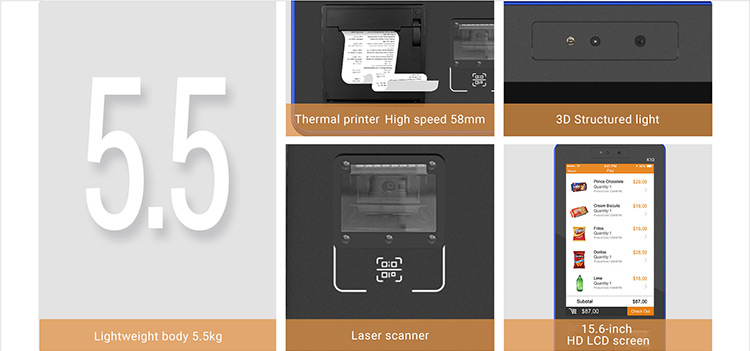
The K10 runs on Android and supports Wi-Fi, Bluetooth, and Ethernet connectivity. Optional peripherals can be configured according to the application, including 1D/2D barcode scanning and camera-based solutions. An integrated 58 mm thermal printer allows users to receive receipts, tickets, queue numbers, transaction records, or other printed information directly from the kiosk.
The benefit of K10 Desktop Mini Kiosk
Android OS, 15.6-inch Touch Screen, MDM, Thermal Printer, QR-code, Face recognition, 4G WFI, Ethernet
Specifications
| OS | Android 7.1 |
| Processor | Quad-Core 1.6GHz |
| Memory | 2GB DDR, 8GB eMMC |
| Display | 15.6-inch, 1080*1920 |
| Thermal Printer | Paper width 58mm, Φ50mm, with auto cutter |
| 1D/2D Barcode Scanner (Optional) | Small Window |
| Face Recognition (Optional) | Single-lens Camera Dual-lens Camera 3D Depth Sensing Camera |
| Communications | WiFi/BT/Ethernet |
| Peripheral Ports | 4 USB Host, 1 RJ45, 1 RJ11, 1 RS232, 1 Micro USB |
| Audio | Digital Audio Speaker |
| Power Supply | 24V/2.5A |
| Stand (Optional) | Check-Out Desk Desk-stand Wall-mounting Bracket |
| MDM (Optional) | Mobile Device Management |


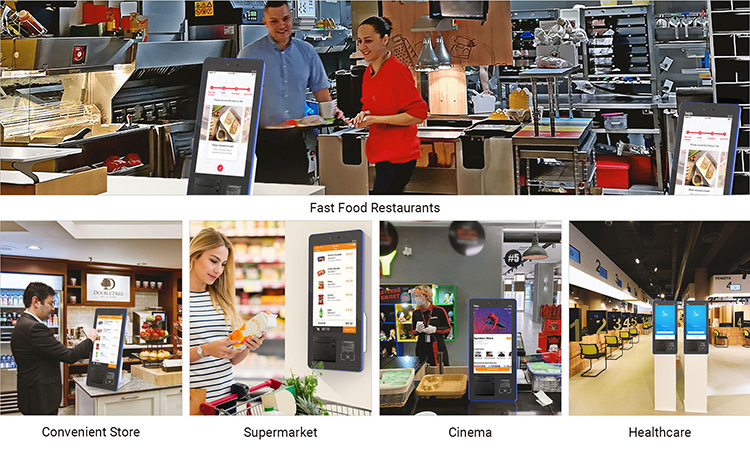
Application K10 provides self-service and automated services for quick response restaurants(QSR), convenience stores, supermarkets, hotels, telecommunications, healthcare, etc.
Why Choose the K10 Desktop Self-Service Kiosk?
A self-service solution does not always require a large floor-standing terminal. For many restaurants, stores, hotels, healthcare facilities, and service counters, a compact desktop kiosk can provide the right balance between functionality, installation flexibility, and available space.
The K10 is designed around this concept. Its 15.6-inch touchscreen provides a clear and interactive interface while its desktop form factor allows businesses to use existing counters instead of redesigning the entire customer area.
Compact Design for Space-Constrained Locations
The desktop format is one of the key advantages of the K10. It can be positioned on a checkout desk, service counter, reception desk, or dedicated kiosk stand.
This makes the K10 suitable for:
- Small retail stores
- Restaurant counters
- Hotel reception areas
- Convenience stores
- Supermarket service areas
- Healthcare reception desks
- Telecommunications stores
- Customer service counters
For businesses with limited floor space, a desktop self-service kiosk can be easier to deploy than a conventional floor-standing kiosk.
15.6-Inch Touchscreen for Customer Interaction
The K10 features a 15.6-inch display with a 1080 × 1920 resolution. The relatively large screen provides enough space for product menus, service options, order details, QR codes, instructions, and confirmation screens.
The touchscreen interface can be customized by software developers or system integrators according to the specific application. This allows the same hardware platform to support different self-service workflows.
For example, a restaurant can use the screen for menu browsing and order confirmation, while a hotel may use it for guest services, check-in assistance, or information access.
Integrated Thermal Printer for Receipts and Tickets
The K10 includes a 58 mm thermal printer designed for applications that require physical output.
The printer supports paper rolls up to 50 mm in diameter and includes an automatic cutter. This makes it suitable for printing short documents such as:
- Customer receipts
- Order confirmations
- Queue numbers
- Service tickets
- Collection slips
- Transaction records
- Short instructions
Integrating the printer into the kiosk helps reduce the need for a separate desktop receipt printer and can make the overall self-service station cleaner and easier to operate.
Optional Barcode Scanner and Camera Solutions
Different self-service applications require different identification and verification methods. The K10 supports optional peripheral configurations so businesses can select the functions required for their application.
An optional 1D/2D barcode scanner can be used to read compatible barcodes and QR codes. Depending on the software application, scanning can be used for customer identification, ticket validation, product lookup, order retrieval, coupon redemption, or other workflows.
Camera options are also available. The K10 can be configured with a single-lens camera, dual-lens camera, or 3D depth-sensing camera for applications that require camera-based functions.
Face recognition is listed as an optional feature and should be configured according to the required software and application environment.
Flexible Connectivity for Self-Service Applications
The K10 provides several communication options, including Wi-Fi, Bluetooth, and Ethernet. This allows system integrators to select a suitable network connection based on the installation environment.
Ethernet can be useful for fixed installations where a stable wired connection is preferred. Wi-Fi provides greater installation flexibility, while Bluetooth can support compatible peripheral devices.
The kiosk also provides multiple peripheral interfaces:
| Interface | Quantity | Typical Purpose |
|---|---|---|
| USB Host | 4 | External peripherals and accessories |
| RJ45 | 1 | Ethernet networking |
| RJ11 | 1 | Compatible peripheral connection |
| RS232 | 1 | Serial peripheral integration |
| Micro USB | 1 | Compatible service or peripheral connection |
The available interfaces make the K10 more adaptable for projects that require additional peripherals or integration with existing equipment.
Android Platform for Application Integration
The K10 uses Android 7.1 with a quad-core 1.6 GHz processor, 2 GB DDR memory, and 8 GB eMMC storage according to the current product specification.
An Android-based architecture can be useful for businesses and system integrators that already have Android applications or require a touchscreen interface for a custom self-service application.
The kiosk can be configured around the software workflow of the final application. For example, an ordering application can guide customers from product selection to confirmation and receipt printing, while a service application can provide menus, forms, QR code scanning, and confirmation screens.
Because software requirements can differ significantly between projects, application compatibility should be evaluated before deployment, particularly when the project requires third-party payment systems, advanced computer vision, or other resource-intensive applications.
Self-Service Ordering for Restaurants and QSR
The K10 is well suited to quick-service restaurant and self-ordering applications.
Customers can interact directly with a touchscreen instead of waiting for an employee to take an order. A typical workflow can include menu browsing, product selection, customization, order review, confirmation, and receipt printing.
A compact desktop kiosk is particularly useful for restaurants that already have checkout counters and want to introduce self-ordering without installing a large floor-standing terminal.
| Traditional Counter Ordering | K10 Self-Ordering Workflow |
|---|---|
| Customer waits for staff | Customer starts the order directly |
| Staff enters the order | Customer selects products on screen |
| Verbal confirmation may be required | Order details can be displayed |
| Receipt may require separate equipment | Integrated thermal printer available |
| Counter staff handles every order | Routine ordering can be automated |
| Additional counter space may be required | Designed for desktop installation |
The K10 can therefore serve as a front-end customer interface while the restaurant’s POS, ordering, kitchen, and payment systems remain connected through the appropriate software integration.
Retail and Convenience Store Applications
In retail environments, the K10 can provide a compact self-service interface for product information, customer services, barcode-based workflows, and selected checkout-related applications.
The optional barcode scanner is particularly useful where customers need to scan a product, ticket, membership code, QR code, or other compatible barcode.
The kiosk can also be deployed alongside staffed checkout stations. Instead of replacing the entire checkout process, businesses can use a desktop kiosk for specific tasks that would otherwise require employee assistance.
This approach can help retailers introduce automation gradually while continuing to use their existing store infrastructure.
Hotel and Hospitality Applications
Hotels can use self-service kiosks to provide guests with convenient access to information and selected services.
A K10 kiosk positioned at a reception area can provide a touchscreen interface for guest-facing applications such as service requests, information access, reservation-related workflows, or ticket and receipt printing.
Its compact footprint can be useful in hotel environments where reception counters need to remain organized and accessible.
Camera and barcode-scanning options may also be considered when the application requires identity, reservation, ticket, or QR-code related workflows.
Healthcare and Telecommunications Applications
The K10 can also be used in healthcare facilities and telecommunications service environments where customers need to interact with digital service systems.
For healthcare applications, the kiosk can provide a front-end interface for registration, information access, queue management, or other software-driven services. Any patient-facing application should be designed and deployed according to the relevant privacy, security, and regulatory requirements.
For telecommunications stores, the kiosk can provide customer self-service functions, QR or barcode scanning, account-related workflows, and printed service records when supported by the application.
Flexible Mounting Options
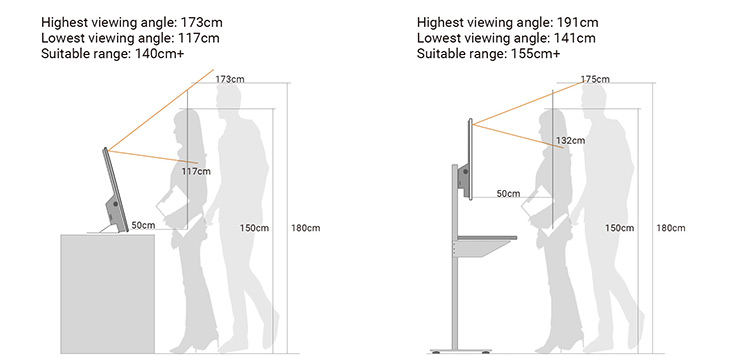
The K10 is not limited to a single installation method. Optional mounting configurations include a checkout desk, desktop stand, and wall-mounting bracket.
This flexibility allows system integrators to adapt the same kiosk platform to different physical environments.
| Installation Option | Recommended Environment | Main Benefit |
|---|---|---|
| Checkout Desk | Retail and QSR counters | Integrates with existing checkout areas |
| Desk Stand | Reception and service desks | Easy desktop deployment |
| Wall-Mounting Bracket | Space-constrained locations | Frees up counter space |
The final mounting configuration should be selected according to the kiosk’s operating position, user accessibility, cable routing, and surrounding equipment.
Desktop Kiosk vs. Floor-Standing Kiosk
The best kiosk format depends on the installation environment and the intended customer workflow. A desktop kiosk is often preferable when the business already has suitable counter space.
| Factor | Desktop Self-Service Kiosk | Floor-Standing Kiosk |
|---|---|---|
| Space Requirement | Low | Higher |
| Installation | Counter or desk | Floor installation |
| Relocation | Generally easier | Usually more involved |
| Existing Counter Integration | Excellent | Limited |
| Suitable for Small Stores | Yes | Depends on available space |
| Reception Desk Use | Excellent | May require dedicated area |
| Restaurant Counter Use | Excellent | Suitable when floor space is available |
| Wall Installation | With compatible bracket | Usually not applicable |
For compact retail stores, restaurant counters, reception areas, and other space-constrained environments, a desktop kiosk can be a practical alternative to a full-size self-service terminal.
K10 vs. Basic Touchscreen Terminal
A touchscreen computer can provide the user interface for a self-service application, but a dedicated kiosk platform can offer additional integrated functions.
| Feature | Basic Touchscreen Terminal | K10 Desktop Kiosk |
|---|---|---|
| Touchscreen | Yes | 15.6-inch touchscreen |
| Integrated Thermal Printer | Usually requires separate device | Available |
| Barcode Scanner | External | Optional integrated solution |
| Camera Options | Depends on system | Multiple camera options |
| Mounting Options | General-purpose | Desktop, checkout, wall-mount |
| Self-Service Design | Application dependent | Designed for customer-facing use |
| Peripheral Interfaces | Varies | Multiple interfaces |
| MDM Option | Depends on software | Available as an option |
The K10 is therefore more suitable when the project requires a dedicated customer-facing kiosk rather than simply a touchscreen display.
Centralized Device Management with Optional MDM
For businesses deploying multiple kiosks, managing devices individually can become inefficient. The K10 offers Mobile Device Management as an optional configuration.
An MDM solution can help organizations manage supported devices remotely, depending on the software platform and deployment architecture. Typical management requirements may include application deployment, device configuration, monitoring, updates, and operational control.
For a single kiosk, centralized device management may not be necessary. For restaurants, retail chains, hotels, or other organizations deploying kiosks across multiple locations, it can become an important part of the overall system architecture.
Designed for Custom Self-Service Solutions
The K10 should be viewed as a hardware platform for self-service applications rather than a one-size-fits-all software product.
The final user experience depends on the application installed on the kiosk and the external systems connected to it. Businesses can develop or integrate software for ordering, customer service, information access, ticketing, scanning, printing, and other automated workflows.
If a project requires payment processing, the payment method and required payment hardware should be specified during system design. The product specification lists communication and peripheral interfaces, but payment functionality should not be assumed to be built into the standard K10 configuration.
How the K10 Self-Service Workflow Works
A typical K10 application can be structured around a simple customer journey:
Step 1 — Start
The customer approaches the kiosk and interacts with the 15.6-inch touchscreen.
Step 2 — Select a Service
The application displays available products, services, or functions.
Step 3 — Scan or Enter Information
When required, an optional 1D/2D barcode scanner or camera can support the relevant workflow.
Step 4 — Confirm
The customer reviews the selected information and confirms the transaction or request.
Step 5 — Complete the Process
The application communicates with the appropriate backend system or peripheral equipment.
Step 6 — Print
When physical output is required, the integrated 58 mm thermal printer can produce a receipt, ticket, confirmation, or other short document.
This workflow can be customized according to the business application.
Benefits for Businesses
Deploying a desktop self-service kiosk can provide several operational advantages.
Reduce Routine Staff Work
Customers can complete selected routine tasks independently, allowing employees to focus on service, preparation, problem-solving, and other higher-value activities.
Improve Customer Convenience
A touchscreen interface provides customers with a direct way to access products and services without always relying on staff assistance.
Make Better Use of Counter Space
The K10 is designed for desktop installation, making it possible to introduce self-service functionality without dedicating a large floor area.
Support Multiple Applications
The same hardware platform can support different customer-facing applications depending on software configuration and connected peripherals.
Simplify Printed Output
With an integrated thermal printer, businesses can provide physical receipts, tickets, or confirmations without necessarily installing a separate printer at the same workstation.
Who Is the K10 For?
The K10 is a good fit for organizations looking for a compact Android-based self-service kiosk with an integrated printer and optional scanning or camera functions.
It can be considered for:
- Quick-service restaurants
- Restaurants and food-service counters
- Convenience stores
- Supermarkets
- Hotels
- Telecommunications retailers
- Healthcare facilities
- Customer service centers
- Other automated service environments
It is especially suitable when a project requires a touchscreen kiosk but does not have enough space or need for a large floor-standing terminal.
Frequently Asked Questions
What is the K10 desktop self-service kiosk?
The K10 is a 15.6-inch desktop self-service kiosk designed for customer-facing applications such as self-ordering, automated services, information access, scanning, and printing.
Does the K10 have a built-in printer?
Yes. The K10 specification includes a 58 mm thermal printer with support for paper rolls up to 50 mm in diameter and an automatic cutter.
Does the K10 support barcode scanning?
Yes. A 1D/2D barcode scanner is available as an optional configuration.
Does the K10 support face recognition?
Face recognition is available as an optional function. The product can be configured with different camera options, including single-lens, dual-lens, and 3D depth-sensing cameras.
What operating system does the K10 use?
The listed configuration uses Android 7.1, with a quad-core 1.6 GHz processor, 2 GB DDR memory, and 8 GB eMMC storage.
Can the K10 connect to Ethernet?
Yes. The K10 supports Ethernet through its RJ45 interface and also supports Wi-Fi and Bluetooth.
Can the K10 be wall-mounted?
Yes. A wall-mounting bracket is available as an optional mounting solution. Desk stands and checkout-desk configurations are also available.
Can the K10 be used as a payment kiosk?
The K10 can serve as the customer-facing interface for applications involving payment workflows, but the exact payment method and payment hardware should be specified according to the project requirements. Payment functionality should not be assumed to be included in the standard hardware configuration.
Is the K10 suitable for restaurant self-ordering?
Yes. Its 15.6-inch touchscreen, desktop form factor, optional barcode scanner, network connectivity, and thermal printer make it suitable for self-ordering applications when integrated with compatible restaurant software and backend systems.
Can the K10 be used for multiple kiosks?
Yes. The hardware platform can be considered for multi-device deployments. Optional MDM support can be useful for organizations that need centralized device management across multiple locations.
Configure the Right K10 Kiosk for Your Application
Every self-service project has different requirements. Before selecting a configuration, consider the touchscreen application, printing requirements, scanning functions, camera requirements, network connection, mounting method, and software environment.
The K10 provides a flexible hardware foundation with a 15.6-inch touchscreen, Android platform, thermal printer, multiple communication interfaces, optional scanning and camera functions, and several installation options.
Whether you are developing a self-ordering solution for a restaurant, a customer service terminal for retail, an information kiosk for a hotel, or an automated service station for another industry, the K10 can be configured around the requirements of the final application.